Zoho CRM vs custom CRM: the edition limits that decide it
Zoho CRM vs custom CRM for Indian sales teams: API credits, webhooks, Deluge access, custom module and field caps by edition, with 2026 INR prices.
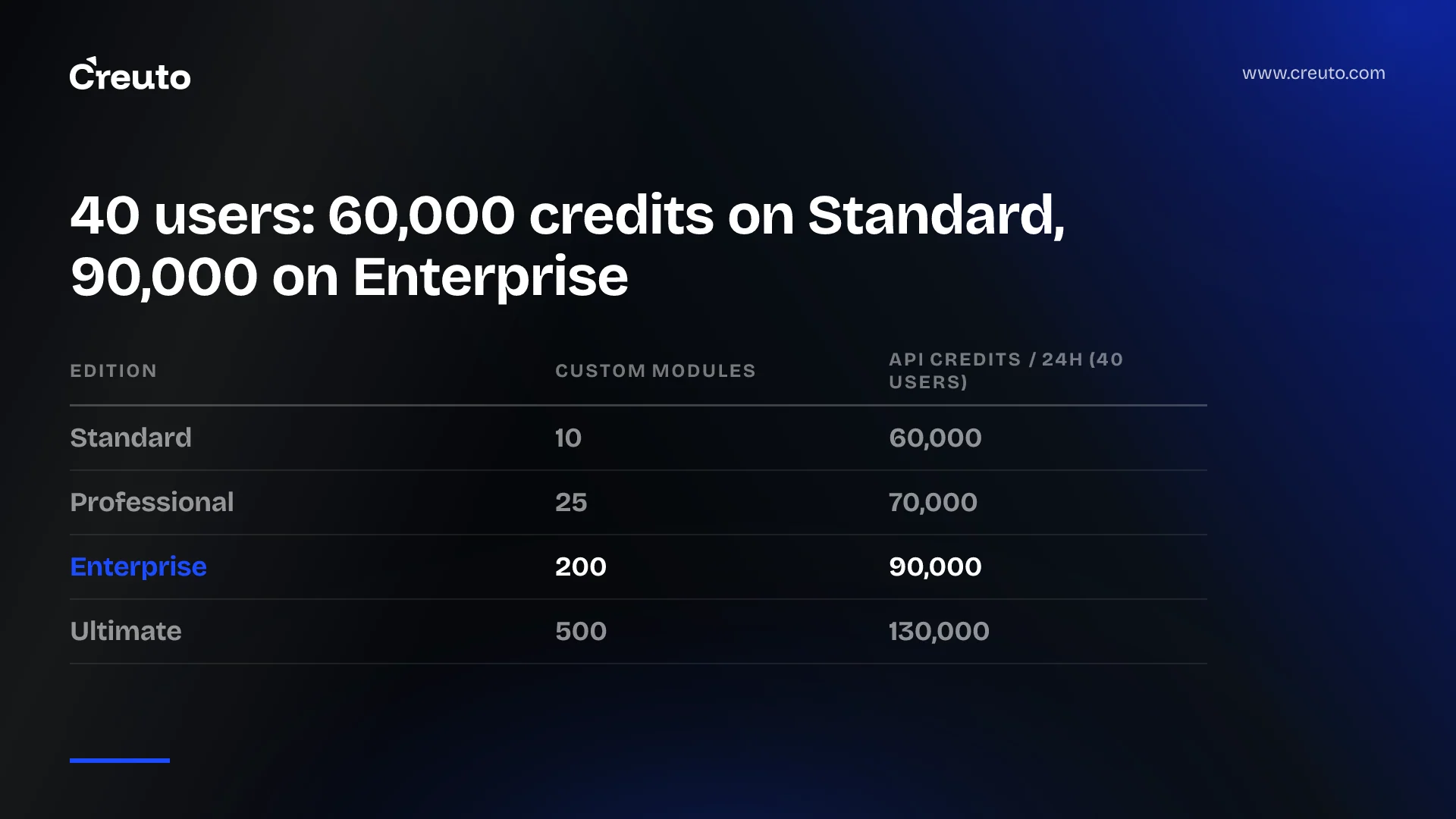
At 40 users, moving from Zoho CRM Standard to Professional adds just 10,000 API credits a day, not the jump from 100,000 to 3,000,000 that the edition caps suggest. That is the first thing to know before you settle zoho crm vs custom crm. By the end of this piece you will know which Zoho limits actually bind a 60-200 person sales team with an ERP, a field app and a dialer attached, and what each upgrade buys against them.
Short answer: for most Indian B2B teams of this size, the daily API credit pool is rarely what forces a rebuild. Custom fields, custom modules, functions access, webhook quotas and record storage on Standard and Professional bind first, and Enterprise lifts most of them at three times the Standard seat price. A custom CRM wins when your process needs more than Enterprise gives, or when the integrations are the product.
The numbers Zoho publishes, edition by edition
Zoho's complete feature list (last updated 12 May 2026, checked November 2026) lists Indian prices per user per month, billed annually: Standard ₹800, Professional ₹1,400, Enterprise ₹2,400 and Ultimate ₹2,600. Monthly billing is ₹1,300, ₹2,100, ₹3,000 and ₹3,200, and local taxes are charged on top. The same page lists the limits that matter more than the price:
| Limit | Standard | Professional | Enterprise | Ultimate |
|---|---|---|---|---|
| Price, annual billing (₹/user/month) | 800 | 1,400 | 2,400 | 2,600 |
| Custom modules | 10 | 25 | 200 | 500 |
| Custom fields per module | 10 | 155 | 300 | 500 |
| API credits per 24h | 50,000 + 250/licence, max 100,000 | 50,000 + 500/licence, max 3,000,000 | 50,000 + 1,000/licence, max 5,000,000 | 50,000 + 2,000/licence, no max |
| Functions | Through extensions only | Through extensions only | Full access | Full access |
| Webhook calls per day | 25,000 or 100/licence, whichever is lower | 50,000 or 100/licence, whichever is lower | 500,000 or 500/licence, whichever is lower | 1,000,000 or 1,000/licence, whichever is lower |
| Data storage (1-200 users) | 100,000 records (200 MB) | 10 GB (about 5M records) | 10 GB (about 5M records) | 10 GB (about 5M records) |
| Sandboxes | None | None | 3 configuration, 2 configuration and data | 7 configuration, 3 configuration and data |
Two rows deserve a second read. The feature list shows 10 custom fields per module on Standard, against 155 on Professional, which on its own rules Standard out for any team that has modelled its own sales process. And the free Zoho CRM tier is limited to three users, so it is not a factor at this size.
How many API calls does Zoho CRM allow per day?
Zoho CRM allows a pool of API credits per organisation in a rolling 24-hour window, not a fixed number of calls. The API limits page for v8 sets the pool at 50,000 credits plus a per-licence amount: 250 on Standard, 500 on Professional, 1,000 on Enterprise and Zoho One, and 2,000 on Ultimate and CRM Plus. Zoho's own example is a 10-licence Standard org, which gets 52,500 credits.
The cap is where the marketing reading goes wrong. The 50,000 base dominates at your size, and the edition maximums are reached only at licence counts you will not have. Standard reaches its 100,000 cap at 200 licences. Professional would need 5,900 licences to reach 3,000,000. For a 40-licence org the pools are:
| Edition | Credits per 24h at 40 licences | Seat cost per month at 40 licences (annual billing) |
|---|---|---|
| Standard | 60,000 | ₹32,000 |
| Professional | 70,000 | ₹56,000 |
| Enterprise | 90,000 | ₹96,000 |
| Ultimate | 130,000 | ₹1,04,000 |
This is arithmetic on Zoho's published formula and prices, before tax. Going from Standard to Enterprise at 40 licences adds 30,000 credits a day for ₹64,000 a month more in seats. If credits were your only problem, add-on credits would be the cheaper route: the API limits page says a super-admin can raise the limit from the API Dashboard, with extra credits billed monthly on a pay-as-you-go basis. Zoho does not publish that rate on the page, so price it with Zoho before you plan around it.
What each integration call actually costs in credits
A credit is not a call. Zoho's API limits page charges 1 credit by default, and Insert, Update and Upsert cost 1 credit per 10 records, up to 100 records a call. Convert Lead costs 5 credits, Send Mail 20, Bulk Write Initialize 500 and Create Custom Module 500. COQL queries cost 1 to 3 credits depending on the LIMIT. Integration tasks called from Deluge functions consume the same credits as the equivalent API call.
Here is an illustration, not a client case. The daily volumes are assumptions for a 40-rep team; the credit costs are Zoho's.
| Integration (assumed daily volume) | How it is written | Credits per day |
|---|---|---|
| Dialer logs 2,400 calls (40 reps x 60) | One record per API call | 2,400 |
| Same 2,400 call logs | Batched, 100 records per upsert | 240 |
| ERP sync polls 3 modules every 5 minutes | COQL, LIMIT up to 200 | 864 |
| Field app reads 150 records per rep | One read per screen | 6,000 |
| 300 automated emails | Send Mail API | 6,000 |
Even written naively, that load is about 15,264 credits, roughly a quarter of a 60,000 pool. The pattern that hurts is not volume but call shape: a single Send Mail costs as much as 200 batched record writes, and a job that called Bulk Write Initialize twenty times a day would spend 10,000 credits on initialisation alone. Because the window rolls from the start of each call, a backfill run at 3pm still counts against tomorrow's 2pm sync. Zoho starts returning an X-API-CREDITS-REMAINING header once usage passes 50% of the daily limit, which is the signal your integration should be reading.
What are the limitations of Zoho CRM once it is integrated?
The limits that break integrated Zoho CRM setups at this size are concurrency, webhooks and functions, not the credit pool. All three come from Zoho's own documentation, and all three scale far less with licences than the credit headline suggests.
Concurrency: ten calls at once on Standard
The API limits page caps simultaneous calls per org per app at 10 on Standard, 15 on Professional, 20 on Enterprise and 25 on Ultimate. A separate sub-concurrency limit of 10 applies on every edition to heavier calls such as Convert Lead, Send Mail, Query, Composite APIs and Insert, Update or Upsert of more than 10 records. Exceed either and you get a TOO_MANY_REQUESTS error. A field app where 40 reps open the app at the 9:30 stand-up is a concurrency problem long before it is a credit problem, unless a middle layer queues and caches.
Webhooks: 4,000 a day for a 40-user team
Webhooks are a common way for a Zoho workflow to tell your ERP that a deal closed. The feature list caps webhook calls from workflow actions at 25,000 a day or 100 per licence on Standard, whichever is lower, and 50,000 or 100 per licence on Professional. At 40 licences both editions give you 4,000 webhook calls a day. Enterprise moves to 500 per licence, or 20,000 at 40 licences. If every logged call, stage change and quote fires an outbound event, 4,000 is the number to model, not 60,000.
Deluge: zoho crm custom functions outside Enterprise
The functions limits page says that on Standard and Professional, functions can only be accessed through extensions. Full access starts at Enterprise, Zoho One, CRM Plus and Ultimate. So "keep scripting in Deluge" on Professional means packaging the logic as an extension, which is a different job from writing a workflow function.
The function credit pools are separate from API credits: 5,000 plus 200 per licence on Standard and Professional, capped at 15,000 and 20,000, and 20,000 plus 500 per licence on Enterprise, capped at 400,000. Each Deluge execution deducts one credit. Execution time is capped at 10 seconds for buttons, related lists, validation rules and REST API functions, 30 seconds for workflow, Blueprint and approval automation, and 15 minutes for schedules. A Deluge function that calls your ERP and waits on a slow response is working against a 30-second clock.
Zoho CRM custom modules and fields: the cap you hit when the process is yours
Zoho CRM allows 10 custom modules on Standard, 25 on Professional, 200 on Enterprise and 500 on Ultimate, according to the feature list. A team that tracks site visits, sample requests, dealer claims, price approvals and service tickets alongside deals uses five before anyone has asked for anything new. On Professional the 25-module cap is enough for many teams; the 155-field cap per module is where heavily customised deal records start to strain.
Creating modules through the API is expensive too: Create Custom Module costs 500 credits and each custom field change costs 10 per field, per the API limits page. That rarely matters day to day, but it tells you Zoho expects structure to be configured once, not generated by your own tooling.
Storage is the quieter cap. Standard holds 100,000 records, or 200 MB, for organisations of 1-200 users. If your ERP pushes invoices, line items or call logs into Zoho, that limit can arrive quickly, and Professional's 10 GB is the realistic floor for an integrated setup.
The strongest case for staying on Zoho CRM
Most of these limits disappear at Enterprise. At 40 licences, Enterprise gives 200 modules, 300 fields per module, full Deluge, three configuration sandboxes, 20,000 webhook calls and 90,000 API credits for ₹11,52,000 a year at annual billing before tax. A custom CRM also has to be hosted, secured, maintained and supported for as long as you use it, and that cost recurs every year. Blueprint, workflow rules, approval processes and reporting are things you would otherwise build.
Staying is the right choice if your sales process is close to the standard lead-account-deal shape, your integrations are a handful of syncs a well-written middle layer can batch, and nobody on your team wants to own a product. In that case the cheaper move is often to fix the integration, not the CRM: batch writes, cache reads in the field app, and replace Send Mail calls with a transactional email service. That is integration work, the kind our API development and integrations team scopes, and it does not require leaving Zoho.
When to build your own CRM instead of upgrading Zoho
Build your own CRM when the data model and the integrations are the reason the CRM exists. The signals are concrete: you need more than Enterprise's limits, your field app and dialer are core to how you sell rather than add-ons, the ERP is the system of record and Zoho is a copy, or you are paying Enterprise seat prices mainly to get API, webhook and function headroom for integrations. A custom build has no per-seat line, no credit pool and no edition gate on functions; you pay for engineering and hosting instead, and you own the roadmap.
We have built one ourselves. Our Sales CRM is an AI-powered CRM and sales engagement platform with a market intelligence engine and 360° customer lifecycle coverage. It is the kind of product where the CRM is built around the selling motion, not configured into a vendor's modules. If you want the seat-cost side of the comparison for other vendors, our breakdown of HubSpot vs custom CRM seat maths and the analysis of Salesforce Core pricing against a custom CRM work through the same decision.
A custom CRM is the wrong choice if Standard or Professional already fits your process, if the process changes every quarter and nobody owns the spec, or if the only pain is a credit pool that add-on credits would fix. On timelines, our published delivery figures are 6-10 weeks for a focused MVP and 3-6 months for larger enterprise platforms, depending on complexity, integrations and scope.
Zoho CRM vs custom CRM: the decision in one table
| Your situation | Better move | Why |
|---|---|---|
| Standard, standard process, few integrations | Move to Professional | 10 fields per module and 100,000 records are the binding caps |
| Professional, credits or concurrency errors | Fix the integration layer | Batching and caching cut credit use more than an upgrade adds |
| Need workflow functions, sandboxes, more webhooks | Price Enterprise | Functions, sandboxes and 500 webhooks per licence start there |
| Paying for Enterprise mainly for integration headroom | Scope a custom CRM | You are buying limits, not features |
Before the next renewal, pull a week of usage from Zoho's API Dashboard, count your webhook-firing workflows, and list the modules and fields your process actually needs. If those numbers land above Professional and you are weighing Enterprise seats against owning the system, our CRM development team will scope a custom CRM against your ERP, dialer and field-app integrations, so you compare a real build against the Enterprise invoice rather than a guess.
Frequently asked questions
Zoho CRM allows a pool of API credits per organisation in a rolling 24-hour window: 50,000 plus 250 per licence on Standard, 500 on Professional, 1,000 on Enterprise and 2,000 on Ultimate. Standard is capped at 100,000. A default call costs one credit, while Send Mail costs 20.
Zoho CRM's feature list allows 10 custom modules on Standard, 25 on Professional, 200 on Enterprise and 500 on Ultimate, with none on the free tier. Custom fields are capped separately, at 10 per module on Standard and 155 on Professional, which often binds before the module cap does.
A custom CRM is better than Zoho CRM when your data model and integrations need more than Enterprise provides, or when you pay Enterprise seat prices mainly for API, webhook and function headroom. If your process fits the standard lead, account and deal shape, upgrading Zoho or fixing the integration layer is usually cheaper.
Zoho CRM Professional and Standard can access functions only through extensions, according to Zoho's functions limits page. Full function access starts at Enterprise, Zoho One, CRM Plus and Ultimate. Each Deluge execution uses one function credit, and workflow functions must finish within 30 seconds.
Build your own CRM when the field app, dialer and ERP integrations are core to how you sell, when Zoho is a copy of data your ERP owns, or when Enterprise limits still fall short. Stay on Zoho when a better-written integration layer that batches and caches would remove the errors.