Which processes to automate first: 3 tests
Which processes to automate first: three tests, plus what 5,000 runs of a 10-step workflow bill on n8n, Zapier, Make and Power Automate.
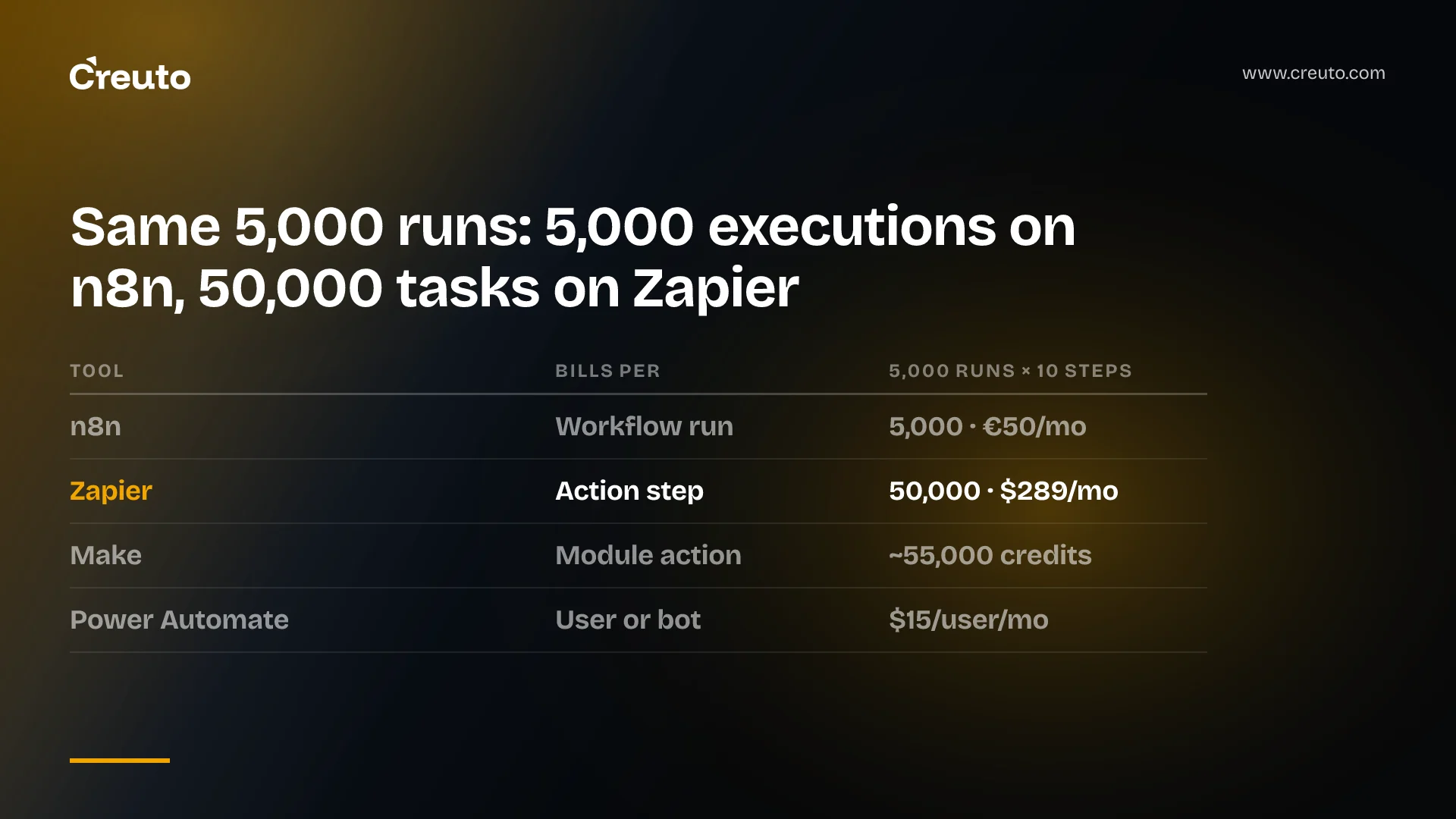
Which processes to automate first? The ones that run hundreds of times a month, already have written steps and owners, and cost little when a run goes wrong. Then price them by the tool's billing unit, not its sticker price: the same 10-step workflow run 5,000 times a month is 5,000 executions on n8n and 50,000 tasks on Zapier.
This post gives you three tests for choosing the first process, the evidence on what AI automation actually saves, and a side-by-side of what n8n, Zapier, Make and Power Automate bill for that same workflow, from their own pricing pages as of November 2026. It ends with the point at which a custom build beats all four.
Which processes to automate first: three tests
The first process to automate passes three tests: volume, definition and cost of error. Check the second hardest, because a tool can only repeat a process that someone has already written down.
- Volume. It runs often enough that minutes per run add up. Invoice intake, ticket routing and employee onboarding qualify. A quarterly report usually does not.
- Definition. Every step has an owner, an input, an output and a "done" state. If two people would describe the process differently, it isn't ready.
- Cost of error. A wrong run is cheap to catch and undo. Routing a ticket to the wrong queue qualifies. Paying the wrong supplier does not, unless a person approves the payment step.
Score your backlog against those three and the order usually sorts itself out. The process that is high-volume, documented and reversible goes first, even if it is not the one with the biggest theoretical saving.
Define the workflow before you automate it
The definition test is where our own work in this area started. Our workflow management platform for an enterprise operations team started from a client whose work was "assigned informally, tracked inconsistently, and communicated across disconnected channels". The first thing we built was structure, not automation. Administrators define each workflow as a sequence of discrete steps with an assigned owner, and a downstream step does not become active until the one before it is marked complete.
Every task moves through four lifecycle states: Not Started, In Progress, Under Review and Completed. The case study reports a 100% task audit trail, one source of truth for all work, and collaboration boards that, in the client's words, "replaced three different tools." Once a process looks like that, automating it is straightforward. Before it looks like that, automation just makes the inconsistency faster.
What AI workflow automation actually saves
The honest answer is: less than the vendor demos imply, and most often in service operations. Stanford's 2025 AI Index (Economy chapter) reports that 49% of survey respondents whose organizations use AI in service operations report cost savings, followed by supply chain management at 43% and software engineering at 41%. But "most of them report cost savings of less than 10%."
Revenue tells the same story. 71% of respondents using AI in marketing and sales report revenue gains, yet "the most common level of revenue increases is less than 5%." The same chapter puts organizational AI use at 78% in 2024, up from 55% in 2023. AI is widely used, and its measured financial effect is usually small.
Two points follow for your first project. Start in service operations, where savings are reported most often: intake, routing, triage and handoffs. And set the business case on hours returned and errors avoided in one process, not on a percentage of company cost. A note on sourcing: these figures are often credited to McKinsey's survey, but the AI Index page itself cites only "survey respondents", so that is how we report them.
Workflow automation pricing: one workflow, four billing units
Each tool counts something different, and the unit decides the bill more than the list price does. To compare them, take one workflow: an invoice-intake flow with a trigger (a new email arrives) and ten action steps, such as extracting the attachment, reading the fields, looking up the supplier, checking the purchase order, creating the bill and posting it for approval. Run it 5,000 times a month.
| Tool | What it bills | Units for 5,000 runs | Plan that covers it (November 2026) |
|---|---|---|---|
| n8n (cloud) | Executions: one per run of the whole workflow | 5,000 executions | Pro, 10,000 executions, €50/month billed annually |
| Zapier | Tasks: one per completed action step | 50,000 tasks | Pro 50,000 tier, $289/month annual or $433.50 monthly |
| Make | Credits: most actions use one, including reading the trigger | About 55,000 credits | Prices not shown in the page text we could read |
| Power Automate | Users or bots, not runs | No run count | Premium, $15 per user/month paid yearly |
The rest of this section explains each row, because each has a condition that changes the number.
n8n execution vs Zapier task pricing
n8n's pricing page is plain about its unit: "An execution is a single run of your entire workflow", "with unlimited steps". Starter is €20 a month billed annually for 2,500 executions, which this workflow outgrows. Pro is €50 for 10,000, so you could double your volume before the bill moves. Business is €667 a month for 40,000 executions, and the page lists it as self-hosted. The page shows only annual-billing prices and lists overage as "capped" on Starter and Pro.
Zapier counts a task "whenever Zapier successfully completes a unit of work for you." Triggers and its built-in tools (Formatter, Paths, Filter, Delay, Looping and others) do not count, and failed actions are not charged. Our ten action steps are 10 tasks a run, 50,000 a month. If two of those steps were Formatter or Filter, you would use 40,000 tasks, and still need the 50,000 tier. Double the volume to 10,000 runs and Zapier's Pro price rises to $489 for 100,000 tasks. n8n's Pro price stays €50.
Zapier's overage rules matter if you size the plan tight. Extra tasks are billed at 1.25 times the base rate on annual plans and 2.5 times on monthly plans, and usage stops at three times your task subscription until the next cycle. Two newer units also sit outside the simple count: an MCP tool call is 2 tasks, and AI by Zapier steps are "charged per AI step and per tool call" at rates by model tier that the pricing page itself does not list. Zapier Agents use a separate unit, activities, which do not touch your task count. We saw the same per-step logic arrive elsewhere in Jira Automation pricing.
Make credits per scenario run
Make bills in credits, and its credits page says "most actions consume 1 credit". Reading data "from an app or webhook" counts, so our trigger plus ten actions is about 11 credits a run, or 55,000 a month. Routers and error-handler modules are free. A single run can use "anywhere from two credits to thousands of credits", and the high end comes from loops: a module that runs once per invoice line multiplies its credits by the number of lines.
Two of Make's rules deserve attention before you commit. When credits run out, "your scenarios won't continue to run, until credits are added again". And since 6 November 2025, extra credits carry a 25% surcharge over plan-included credits, whether bought by hand or automatically. Make's pricing page loaded its plan prices separately from the text we could read, so we have not quoted them. The help center's one example is $338.13 a month for 500,000 credits on Pro.
Power Automate per bot pricing for RPA
Microsoft prices Power Automate by who or what runs the flow. Premium is $15 per user a month, paid yearly, and covers cloud flows "within service limits", which the page links to but does not quantify. That makes it the cheapest row in the table on paper, if your systems have connectors and your staff are already licensed.
The price changes when a step has to drive a desktop application with no API. Unattended desktop automation (RPA) needs the Process plan at $150 per bot a month, or Hosted Process at $215 with a Microsoft-hosted virtual machine. A bot runs one unattended desktop flow at a time, so two flows that must run at once need two bots. The Process Mining add-on, for discovering which processes you actually run, is $5,000 per tenant a month.
When custom workflow automation beats Zapier or n8n
The strongest case for the tools is real. For the first process, n8n Pro at €50 or a Zapier tier under $300 a month costs far less than any custom build. If your process passes the three tests and lives inside apps that already have connectors, start there.
Custom workflow automation wins in three situations:
- The workflow itself is the product. When you need owners, states, approvals and an audit trail that people work inside every day, that is an application, not a sequence of connector calls.
- Per-step billing meets volume. A step-billed tool grows with every step you add and every loop it runs. At high volume, a service you own is billed by compute instead.
- Running out stops the business. Make stops scenarios when credits run out and Zapier stops at three times the plan. If a stopped invoice run means a missed payment, that limit is a design constraint, not a pricing detail.
For a structured platform of the kind described above, our case study's FAQ puts the typical span at 3-5 months from discovery to deployment. We set out the wider framework for which layers to own in build vs buy enterprise software.
Processes not to automate with AI yet
Automation is the wrong choice when the process fails the definition test, when most runs are exceptions that need judgment, or when it runs a few dozen times a month. In the first case you automate confusion. In the second, the human review step costs more than the manual work it replaced. In the third, the setup and upkeep never pay back.
Choosing your first process this quarter
Write down your five most-requested manual processes. For each, record its monthly volume, whether its steps and owners are written down, and what a wrong run costs. Then count its steps and multiply by volume to get the tasks or credits it would consume. That second number tells you whether a tool tier fits or whether the process needs to be built.
If your first candidate turns out to need defined steps, owners and an audit trail before anything can be automated, our custom software development team can map that workflow with you and scope whether it belongs on n8n, Zapier, Make, Power Automate or a build of its own.
Frequently asked questions
The processes to automate first run hundreds of times a month, already have written steps and owners, and are cheap to correct when a run goes wrong. Invoice intake, ticket routing and onboarding often qualify. A process nobody has defined consistently is not ready, because automation only repeats what is already written down.
n8n is usually cheaper than Zapier for multi-step workflows because n8n bills one execution per workflow run with unlimited steps, while Zapier bills one task per completed action step. A 10-action workflow run 5,000 times is 5,000 n8n executions but 50,000 Zapier tasks, as of November 2026.
A Zapier task is counted each time Zapier successfully completes an action step. Triggers, failed actions and built-in tools such as Formatter, Filter, Paths, Delay and Looping do not count. An MCP tool call counts as two tasks, and AI by Zapier steps are charged per AI step and per tool call.
Companies report modest AI cost savings. Stanford's 2025 AI Index finds 49% of respondents using AI in service operations report savings, ahead of supply chain at 43% and software engineering at 41%, but most report savings under 10%. The most common revenue increase from AI is under 5%.
Custom workflow automation makes sense when the workflow needs owners, states, approvals and an audit trail people work in daily, when per-step billing grows with volume, or when a tool stopping at its credit or task limit would halt critical work. A structured workflow platform typically takes three to five months to deliver.