How to build a logistics app: three apps, one routing bill
How to build a logistics app: driver, dispatcher and tracking apps on one backend, and the routing API bill per stop against per-driver SaaS pricing.
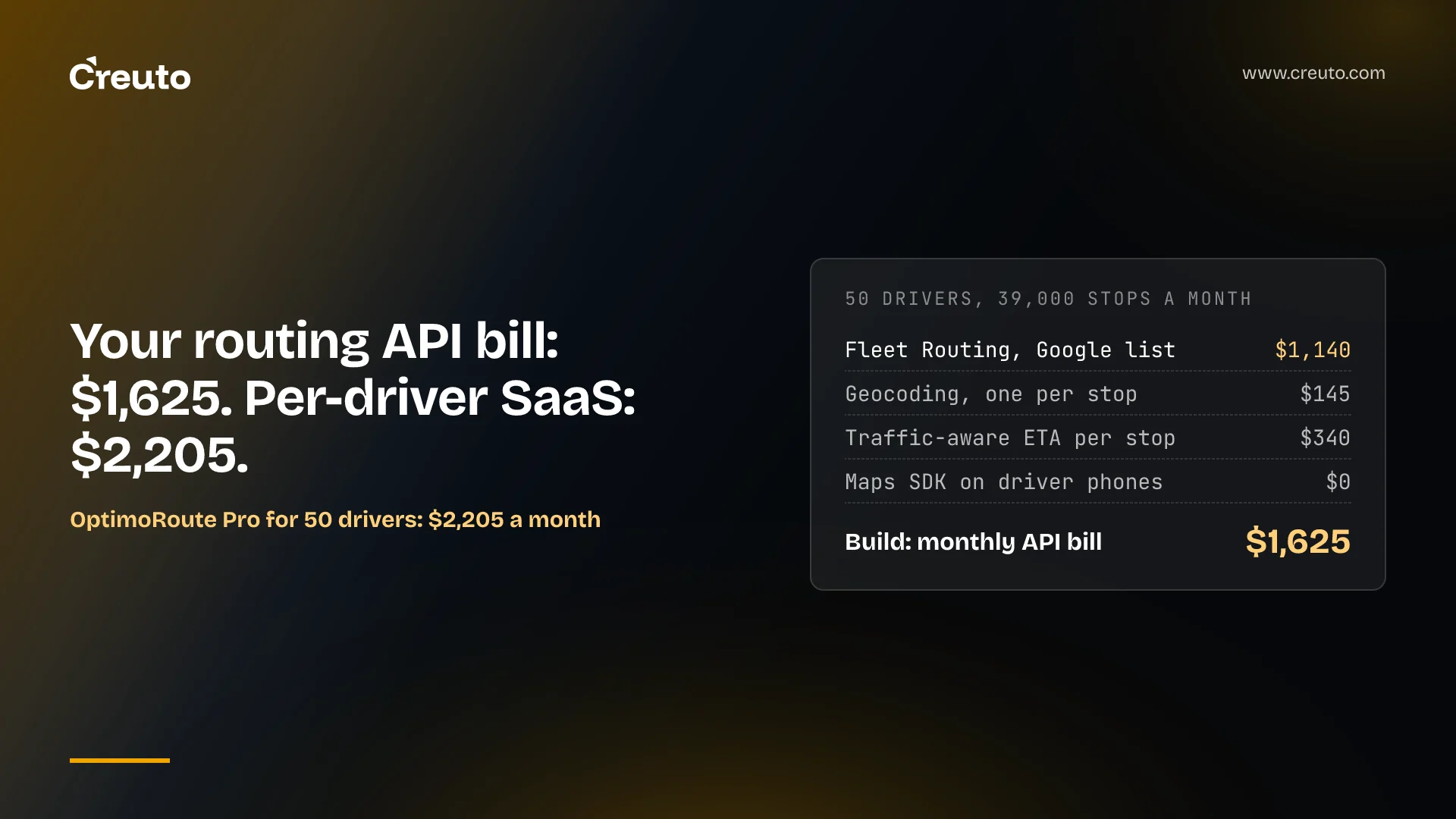
A 50-driver fleet doing 30 stops a day runs about 39,000 stops a month, and on Google's published list prices the maps and routing calls behind those stops come to roughly $1,625 a month. OptimoRoute's Pro plan for the same 50 drivers is $2,205. That gap is the honest starting point for how to build a logistics app: you are building three apps on one backend, and the per-stop API bill is the one cost you can price before writing any code.
This post is for the head of operations or CTO replacing WhatsApp dispatch and spreadsheets. By the end you will know what the driver app, dispatcher dashboard and customer tracking page each have to do, what the routing and maps bill looks like per stop on three providers, where per-driver SaaS pricing crosses over, and which reasons to build survive once the arithmetic is done. Prices are as read on 21 November 2026.
How to build a logistics app: three apps on one backend
A logistics app is three client apps sharing one backend: a driver app, a dispatcher dashboard and a customer tracking page. The backend owns orders, stops, drivers, routes and proof of delivery, and each client sees a different slice of that same data. Most build estimates go wrong by pricing "the app" as one thing.
| App | Who uses it | What it must do |
|---|---|---|
| Driver app | Drivers, on Android and iOS | Show today's route, navigate to each stop, capture proof of delivery (photo, signature, barcode scan), keep working offline, report GPS position in the background |
| Dispatcher dashboard | Operations team, in a browser | Import orders, run route optimization, assign drivers, watch the live map, handle exceptions and failed deliveries |
| Customer tracking | Your customers' recipients | Show live ETA and driver position, send SMS or push notifications, collect delivery feedback |
| Backend | All three | Order and stop model, geocoding, routing and ETA calls, real-time location fan-out, proof-of-delivery storage, integrations with your ERP or storefront |
That split is not theoretical for us. When we built FlashNow, a quick commerce and hyperlocal delivery platform, it shipped as three platforms serving four roles, with no centralised warehouses. The same shape shows up in our breakdown of quick commerce app development cost, which prices four apps rather than one.
The driver app is where platform rules decide the design
The driver app is the hardest of the three because both mobile operating systems are built to stop apps from tracking location in the background. Real-time GPS tracking for a delivery fleet has to work inside those rules, not around them.
Android: a typed foreground service
Beginning with Android 14 (API level 34), Android requires every foreground service to declare a type. Continuous driver tracking uses the location type, which needs the FOREGROUND_SERVICE_LOCATION permission in the manifest and a granted ACCESS_COARSE_LOCATION or ACCESS_FINE_LOCATION runtime permission. The same page says you cannot start a location foreground service while the app is in the background unless the user has granted ACCESS_BACKGROUND_LOCATION. Apps targeting Android 14 or higher also have to declare their foreground service types in the Play Console's App content page.
The practical consequence: tracking starts when the driver taps "Start shift" with the app open, and the notification stays visible for the whole shift. Design the shift flow around that, rather than expecting tracking to resume silently after a reboot.
iOS: suspension is the default
Apple's documentation on handling location updates in the background says iOS suspends most apps shortly after they move to the background, and suspended apps don't receive location updates until they run again. To get timely updates you enable the Location updates background mode and start a CLBackgroundActivitySession while the app is in the foreground. If the system terminates the app, Apple says you must recreate that session immediately on relaunch in the background.
Driver app with proof of delivery and offline sync
A driver app with proof of delivery has to capture a photo, signature or barcode scan at a stop with no signal, queue it, and sync it later without duplicating the delivery event. That means a local store on the device, idempotent writes on the server and a clear rule for which side wins when the dispatcher edits a stop the driver has already completed offline. None of this is priced by any API; it is engineering time, and it is the part of logistics mobile app development that SaaS vendors have already paid for.
Route optimization API for a logistics app: the bill per stop
The routing and maps bill for a custom logistics app is the sum of four calls per stop: geocode the address, optimize the route, compute a traffic-aware ETA, and show a map. Here is that bill on Google Maps Platform's global list, per 1,000 billable events, from the Google Maps Platform pricing page.
| SKU | Free each month | Up to 100,000 (per 1,000) | 100,001-500,000 (per 1,000) |
|---|---|---|---|
| Route Optimization: Fleet Routing | 1,000 | $30.00 | $14.00 |
| Route Optimization: Single Vehicle Routing | 5,000 | $10.00 | $4.00 |
| Geocoding | 10,000 | $5.00 | $4.00 |
| Routes: Compute Routes Pro | 5,000 | $10.00 | $8.00 |
| Routes: Compute Routes Essentials | 10,000 | $5.00 | $4.00 |
| Maps SDK | Unlimited | No charge | No charge |
The ETA line matters more than it looks. Google's Routes API billing page says requests using the TRAFFIC_AWARE or TRAFFIC_AWARE_OPTIMAL modifiers bill as Pro, while Essentials covers basic requests with at most 10 intermediate waypoints. An ETA a customer can trust is a traffic-aware ETA, so it is priced at the Pro rate.
The worked example: 50 drivers, 39,000 stops a month
Our assumptions: 50 drivers, 30 stops each a day, 26 working days, so 39,000 stops a month. Each stop is geocoded once, sits in one fleet-routed plan, and gets one traffic-aware ETA calculation. Driver phones display maps through the Maps SDK. Free monthly caps are deducted first; taxes and negotiated discounts are ignored.
- Fleet Routing: (39,000 - 1,000) x $30 / 1,000 = $1,140
- Geocoding: (39,000 - 10,000) x $5 / 1,000 = $145
- Compute Routes Pro: (39,000 - 5,000) x $10 / 1,000 = $340
- Maps SDK on driver phones: $0
That totals $1,625 a month, about 4.2 cents a stop. If drivers are pre-assigned to zones and you only need each driver's sequence solved, Single Vehicle Routing replaces Fleet Routing at (39,000 - 5,000) x $10 / 1,000 = $340, and the total drops to $825, about 2.1 cents a stop. Every extra ETA refresh per stop adds another 39,000 Pro calls, or $390 a month once the free cap is used. Re-planning multiplies the optimization line the same way; our post on AI route optimization and the per-shipment bill covers the solver pricing, the India list and when OR-Tools replaces the API.
The same stops on Geoapify and Mapbox
Geoapify prices the same work in daily credits, and the result is an order of magnitude cheaper. Its Route Planner documentation charges n x min(n, 10) credits, where n is the number of unique locations, and allows up to 300 unique coordinates per call. Split the day into 10 zone requests of 5 driver start points and 150 jobs, and each request has 155 locations, or 1,550 credits: 15,500 credits a day. Add 1,500 geocoding credits and 1,500 routing credits, assuming each per-stop call bills at the 1-credit-per-simple-request rate on the Geoapify pricing page, and the day needs 18,500 credits. That fits the API 25 plan, 25,000 credits a day for $109 a month, or under 0.3 cents a stop.
The caveat is that credits are a daily quota, so you size the plan for your busiest day, not your average one. Mapbox is the third option worth checking: Mapbox's pricing page lists Directions and Optimization API requests free up to 100,000 a month and Maps SDKs for Mobile free up to 25,000 monthly active users, which a 39,000-stop month sits inside. Check its per-request coordinate limits against your route sizes before planning a fleet on it.
In-app navigation is a separate line
Turn-by-turn navigation inside your own driver app is priced on its own. Google lists Navigation Request at $25 per 1,000 after 1,000 free, and Mapbox charges $0.08 per trip after 1,000 free trips a month. The alternative is handing the driver off to the Google Maps app: Google's Maps URLs documentation says you don't need an API key to use them and supports a navigate action. You lose control of the navigation screen; you also lose a line item.
What per-driver SaaS charges for the same 39,000 stops
Off-the-shelf delivery management software prices by driver, by vehicle or by delivery, and each model behaves differently as your stop density changes. Here are the published prices for the same 50-driver fleet.
| Vendor and plan | Published price | 50 drivers a month | Per stop at 39,000 |
|---|---|---|---|
| OptimoRoute Lite | $35.10 per driver, billed annually | $1,755 | 4.5 cents |
| OptimoRoute Pro | $44.10 per driver, billed annually | $2,205 | 5.7 cents |
| SmartRoutes Essentials | $54 per vehicle | $2,700 | 6.9 cents |
| SmartRoutes Premium | $65 per vehicle | $3,250 | 8.3 cents |
| Onfleet Enterprise | Typically starts at $3,099 for 10,000+ deliveries | $3,099 or more | Not published |
Sources: OptimoRoute pricing, SmartRoutes pricing and Onfleet pricing, read 21 November 2026. The feature lines matter as much as the price. OptimoRoute puts proof of delivery and customer notifications in Pro, not Lite. SmartRoutes puts proof of delivery in Essentials but its delivery tracking portal and barcode scanning only in Premium. Onfleet's Launch plan includes 2,500 deliveries for $619, about 25 cents a delivery, and bills extra deliveries per task at a rate the page does not publish.
Upper is priced differently again. Its pricing page charges per user, from $40 a month billed yearly, with a cap on driver profiles per plan, and lists API and webhooks only on the Enterprise plan. If your plan is to connect a route planner to your own ERP, that line decides more than the headline price.
Custom logistics app vs SaaS: the routing bill rarely decides it
The strongest case for buying is in the table: on Google's list prices, the build saves about $580 a month against OptimoRoute Pro for this fleet, roughly $7,000 a year. That will not pay for one engineer maintaining three apps, a backend and two app store listings. If your routes are stable, your proof of delivery is a photo and a signature, and you have no system the planner needs to talk to, buy the SaaS and spend the engineering budget elsewhere.
The arithmetic also shows where per-driver pricing turns against you. Beyond the free caps, Google's marginal cost is 4.5 cents a stop (3 cents routing, 0.5 cents geocoding, 1 cent ETA). At OptimoRoute Pro's $44.10, the crossover is about 980 stops per driver a month, or around 38 stops a day over 26 days. Below that density, per-driver SaaS costs more per stop than the API stack; above it, the API stack costs more, unless you move to Single Vehicle Routing or a credit-priced provider like Geoapify.
So the reasons to build are rarely the API bill. They are the things a per-driver product cannot see:
- Dispatch rules that live in your ERP, such as credit holds, cold-chain slots or customer-specific time windows
- One customer-facing app that combines ordering and tracking, rather than a vendor-branded tracking link
- Data you want to own and query, such as stop-level service times feeding your own planning
- Drivers who are also sales or collection staff, with workflows no delivery product models
This is the wrong build if none of those apply. It is also the wrong build if you cannot staff maintenance: both mobile platforms change their background-location rules over time, and a tracking app that breaks on an OS update is worse than WhatsApp.
Logistics app development cost: what moves the number
Logistics app development cost is driven by the number of surfaces and integrations, not by the map. We don't quote a range without scope. What we state publicly is that a focused MVP typically takes us 6-10 weeks, and larger enterprise platforms 3-6 months depending on complexity, integrations and scope.
A sensible first release for a 50-driver fleet is the driver app with offline proof of delivery, a dispatcher dashboard with a single optimization call per day, and an SMS tracking link rather than a full customer app. Our default for the driver app is React Native, so one codebase covers Android and iOS, with Google Maps, Firebase Cloud Messaging for push and Socket.io for live positions on the dispatcher map. Geofencing, barcode scanning and live ETA refresh come next, once you know your real stop density and the API bill it produces.
Where to start if you are replacing WhatsApp dispatch
Start by counting: drivers, stops per driver per day, and how often a route changes after it leaves the depot. Those three numbers tell you your per-stop API bill on each provider, where per-driver SaaS crosses over, and whether re-planning will multiply the optimization line. If the count says SaaS, take it and keep your spreadsheets for reporting.
If the count says build, because your dispatch rules, integrations or customer experience do not fit a per-driver product, our mobile app development team can scope the driver app, dispatcher dashboard and tracking page against your stop volumes, including which routing provider and SKU the numbers favour before anything is built.
Frequently asked questions
You build a logistics app as three clients on one backend: a driver app for routes, GPS tracking and proof of delivery, a dispatcher dashboard for optimization and assignment, and a customer tracking page with live ETAs. The backend owns orders, stops, routing calls and real-time location, and integrates with your ERP or storefront.
On Google Maps Platform's global list, a 50-driver fleet doing 39,000 stops a month pays about $1,625 a month for fleet routing, geocoding and one traffic-aware ETA per stop, roughly 4.2 cents a stop. Geoapify's credit pricing fits the same volume on a $109 monthly plan, as of November 2026.
A logistics app needs a driver app with turn-by-turn navigation or a hand-off to Google Maps, background GPS tracking, offline proof of delivery with photo, signature and barcode scanning, a dispatcher dashboard with route optimization and a live map, and customer notifications with a live ETA tracking link.
Buy delivery management software when routes are stable, proof of delivery is a photo and signature, and nothing needs to integrate with your ERP. Build when dispatch rules, integrations or a combined ordering and tracking app do not fit a per-driver product, because the routing API bill alone rarely justifies a custom build.
Background location tracking fails in driver apps because both mobile platforms restrict it. Android 14 requires a typed location foreground service and background location permission to start it from the background, while iOS suspends apps shortly after they leave the foreground unless a background activity session is running.