GPT-6.1 Sol in Copilot: who says it uses fewer tokens
GPT-6.1 Sol reached GitHub Copilot on 29 September 2026. The token saving is GitHub's own claim, not a measurement - here is what really changed on price.
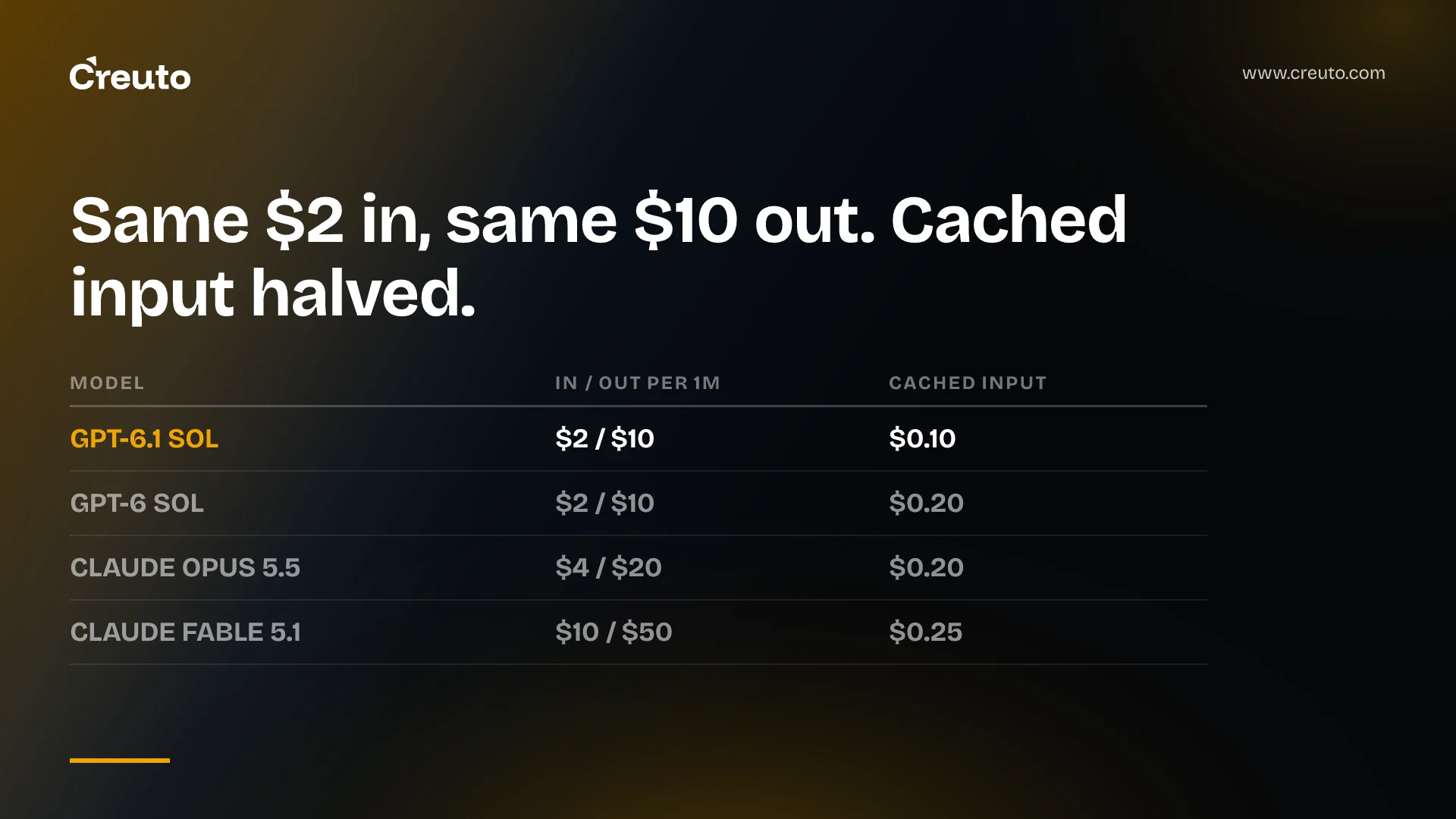
GPT-6.1 Sol landed in GitHub Copilot on 29 September 2026, and the headline claim — fewer tokens for the same coding work — is GitHub's own, from its own early testing, with no published measurement behind it. What is verifiable is the price list. On GitHub's model pricing page, GPT-6.1 Sol costs the same per input and output token as GPT-6 Sol and half as much for cached input. That is the only cost difference you can bank today.
Here are the facts as of 1 October 2026:
- Available on Copilot Pro+, Max, Business and Enterprise — not Pro or Free.
- Surfaces: VS Code, Visual Studio, Copilot CLI, the Copilot coding agent, the GitHub Copilot app, github.com, GitHub Mobile, JetBrains IDEs, Xcode and Eclipse.
- Billing: provider list pricing under usage-based billing. $2.00 input, $0.10 cached input, $10.00 output per million tokens at up to 272K context.
- Rollout: gradual. New models are enabled by default for Business and Enterprise unless an administrator disables them in model policies.
The "fewer tokens" claim has no independent measurement behind it
GitHub's exact wording is that in early testing it reliably completed tasks while using noticeably fewer tokens and steps than earlier models in the GPT-6 and GPT-5.6 families. Read that carefully. "Early testing" is unnamed, "noticeably" is not a number, and no task set, repository or token count is published.
We went looking for a third party that had measured it. As of 1 October 2026, Artificial Analysis has published token-per-task figures for GPT-6 Sol — $1.05 cost per Intelligence Index task, 77M output tokens across the index — but has no entry for GPT-6.1 Sol at all. OpenAI's own model page does not quantify it either; it describes GPT-6.1 Sol as offering near-Astra performance at a lower cost and tells you to compare it with Astra on your own tasks. So: only a vendor claim exists.
That is not a reason to ignore it. Token efficiency is exactly the kind of gain that shows up in a vendor's internal eval before anyone outside can see it. It is a reason not to write it into a budget.
What did change with GPT-6.1 Sol: cached input halved
Compare GitHub's own published rates for the two models and one number moves.
| Model (up to 272K context) | Input / 1M | Cached input / 1M | Output / 1M |
|---|---|---|---|
| GPT-6.1 Sol | $2.00 | $0.10 | $10.00 |
| GPT-6 Sol | $2.00 | $0.20 | $10.00 |
| Claude Opus 5.5 | $4.00 | $0.20 | $20.00 |
| Claude Fable 5.1 | $10.00 | $0.25 | $50.00 |
Cached input drops from $0.20 to $0.10 per million tokens, and the long-context tier above 272K drops from $0.40 to $0.20. Input and output are unchanged. For agentic coding that is the right lever to have moved: a coding agent re-sends the same repository map, instructions and file context on every step, so cached input is usually the largest line on the bill by volume and the smallest by unit price.
Work the arithmetic yourself. Take an agent session that reads 2M cached tokens of context and writes 40K output tokens. On GPT-6 Sol: 2 × $0.20 + 0.04 × $10.00 = $0.80. On GPT-6.1 Sol: 2 × $0.10 + 0.04 × $10.00 = $0.60. That is 25% off that shape of work, and nothing at all off a single-shot completion with no cached context. The saving tracks how cache-heavy your usage is and nothing else.
How Copilot converts that into your bill
Usage-based billing prices each interaction by the model and the tokens consumed, then converts the total into AI credits at 1 AI credit = $0.01 USD. Copilot Pro is $10 a month with 1,500 credits, Pro+ is $39 with 7,000, and Max is $100 with 20,000. Because GPT-6.1 Sol is billed at provider list pricing, the credit cost of a task is just the token cost in cents — which makes it one of the few Copilot models where you can predict spend from an API price list.
Which model should I pick in Copilot: what to switch and what to keep
Concretely, for a team already paying for Copilot seats and usage:
- Switch: long agentic sessions on a large repository, where the same context is re-read dozens of times. This is where the halved cached input rate pays, and where GitHub's token claim — if it holds — compounds.
- Switch: anything currently on Claude Opus 5.5 purely for cost reasons. At $4/$20 against $2/$10, GPT-6.1 Sol is half the list price on both directions. Run your evaluation set first; do not switch on price alone.
- Keep: whatever is passing review today on GPT-6 Sol for short, single-turn work. Input and output prices are identical, so there is no saving to collect and you would be re-validating a model for nothing.
- Keep: the cheaper models for mechanical work. GitHub lists GPT-6 Luna at $0.10 input and $0.50 output per million — twenty times cheaper than Sol on both. Our analysis of how open-weight models run 56% of tokens on 14% of spend makes the same point: the frontier model is rarely the right default.
How to compare Copilot models on your own repository
The measurement GitHub did not publish is one you can do in an afternoon, and it is the method we use in every AI engineering engagement where model choice is a budget line:
- Pick 20 to 30 real tasks from closed pull requests in one repository, each with a known-good diff.
- Run each task twice — once on GPT-6 Sol, once on GPT-6.1 Sol — from a clean checkout, with the same prompt and the same agent settings.
- Record three things per run: whether tests pass, total tokens billed, and number of agent steps. Token counts are visible per model in Copilot's usage reporting.
- Divide total spend by successful tasks. Cost per successful task is the only figure that survives contact with a finance review; tokens per task on its own rewards a model that gives up early.
One caution on timing. Six Copilot models are being retired on 19 October 2026, so if your baseline is one of them, run the comparison against a model that will still be there in November. And if you are still deciding how much of your coding work belongs on a frontier model at all, our read on OpenAI halving the price of a good model covers the trend that made this release possible.
The practical position on GPT-6.1 Sol: enable it, default your long agentic sessions to it, and let the cached input rate pay for itself. Hold the token-efficiency claim as unproven until you have measured it on your own code, or until someone outside GitHub publishes a number.
Frequently asked questions
Yes. GitHub made GPT-6.1 Sol available on 29 September 2026 to Copilot Pro+, Max, Business and Enterprise users across VS Code, Visual Studio, Copilot CLI, the coding agent, JetBrains IDEs, Xcode, Eclipse, github.com and GitHub Mobile. The rollout is gradual, so access may lag.
No. GitHub lists both at $2.00 input and $10.00 output per million tokens up to 272K context. GPT-6.1 Sol is cheaper on cached input at $0.10 per million against $0.20 for GPT-6 Sol, which is the only price difference between the two models.
GitHub says so from its own early testing, using the phrase noticeably fewer tokens and steps, but publishes no task set or token counts. As of 1 October 2026 no independent evaluation of GPT-6.1 Sol exists, so only a vendor claim supports it. Measure it yourself before budgeting for it.
Default long agentic sessions on large repositories to GPT-6.1 Sol, where the halved cached input rate applies to context re-read on every step. Keep cheaper models such as GPT-6 Luna, listed at $0.10 input and $0.50 output per million, for mechanical or single-shot work.
Each interaction is priced by the model and the input, output and cached tokens it consumes, then converted into AI credits at 1 AI credit = $0.01 USD. Copilot Pro includes 1,500 credits for $10 a month, Pro+ 7,000 for $39, and Max 20,000 for $100.
Take 20 to 30 real tasks from closed pull requests with known-good diffs, run each on both candidate models from a clean checkout with identical prompts, and record test outcome, tokens billed and agent steps. Divide total spend by successful tasks to get cost per successful task.
