GitHub Actions workflow lockfiles: what they pin and miss
GitHub Actions workflow lockfiles pin transitive action dependencies, but they break tag-pinned allowlists and skip reusable workflow dependencies.
GitHub Actions workflow lockfiles entered public preview on 14 October 2026, and GitHub's documentation now says something that reverses a decade of hardening advice: for repositories using a lockfile, "pinning actions to SHAs in workflow files is no longer necessary". The lockfile covers transitive action dependencies, which hand-pinned SHAs never did.
It also leaves a gap that matters most to the organisations most likely to adopt it. Dependencies of reusable workflow calls are not covered by your lockfile — they are covered by the lockfile of the repository where the reusable workflow is defined. If your shared CI logic lives in a central repository, that repository needs its own onboarding, and yours cannot protect you.
What GitHub Actions workflow lockfiles pin
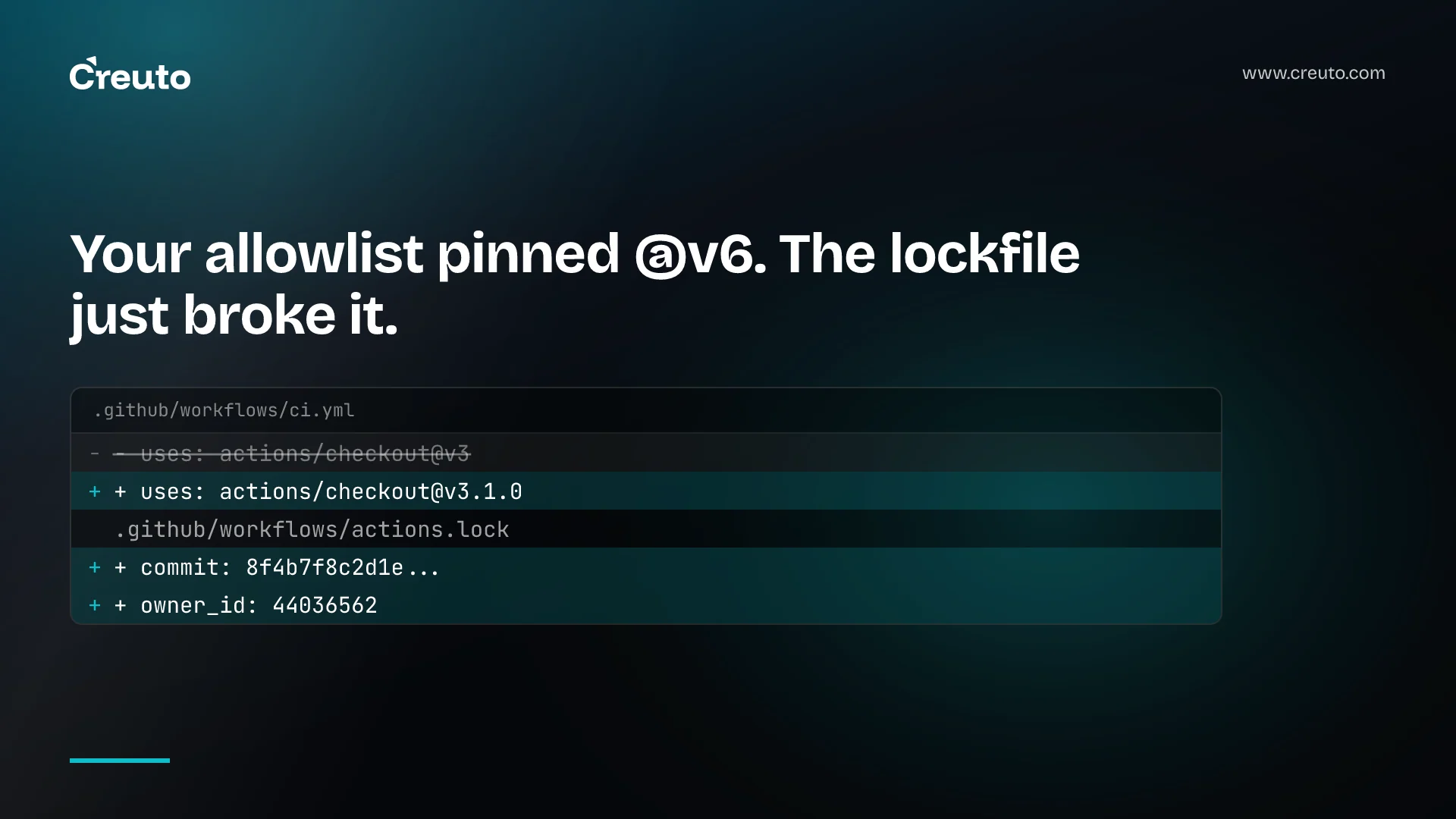
The file lives at .github/workflows/actions.lock and has two sections. workflows records which dependencies each onboarded workflow uses. dependencies records, for each reference, the ref you wrote, the commit it resolved to, and the owner_id and repo_id of the source repository.
Those last two fields are the interesting part. Actions Runtime uses the numeric IDs to confirm the repository behind a name has not changed — which catches the case where an account is deleted and the name re-registered by somebody else, a class of attack that SHA pinning alone does not address because you would simply be fetching a SHA that no longer exists.
Per the concepts documentation, adoption is per workflow and all-or-nothing within one: once a workflow is onboarded, every action dependency it uses must appear in the lockfile, and the locked commit must exist within a branch of the source repository.
Adoption, with the commands
The lockfile is generated by a GitHub CLI extension and must never be hand-edited:
gh extension install github/gh-actions-lock

# all workflows under .github/workflows/
gh actions-lock

# one workflow
gh actions-lock .github/workflows/ci.yml
Rerun it whenever you add a workflow with uses dependencies, or add or remove dependencies in an existing one.
Three things in the diff that will surprise you
Review the whole diff, not the lockfile. The extension changes your workflow files too.
- It rewrites your
usesreferences to the resolved version —@v3becomes@v3.1.0. If you have been deliberately floating on a major tag to pick up patches, that intent is now expressed in the lockfile rather than the workflow, and the workflow reads differently to every human who opens it. - It breaks tag-pinned action allowlists. This is the one that will cause an incident. If your organisation restricts actions with an allowlist containing entries like
actions/checkout@v6, those entries stop matching once runs resolve to locked SHAs. The docs are explicit that you must switch them to a wildcard or the full commit SHA. An allowlist is a security control, and widening it to a wildcard to make lockfiles work is a trade worth making deliberately rather than discovering at 2am. - Local action references change syntax.
uses: ./…becomesuses: $/…, in workflows and in in-repositoryaction.ymlfiles. These need no lockfile entry. Relatedly, if the extension skips a workflow over a local path action, it is because local paths resolve from the repository root rather than from the workflow file's directory — a long-standing confusion that onboarding surfaces.
When a reference legitimately moves
Maintainers repoint tags for good reasons. Two escape hatches exist, and the difference between them is the whole security model:
# the move is legitimate; re-resolve and record it
gh actions-lock --relock

# the originally locked commit is now unreachable
gh actions-lock --relock --accept-moved
Reach for the second only after checking upstream history. An unreachable locked commit means a force-push or a deletion removed the exact code you reviewed, and that is either sloppy maintenance or the thing the lockfile exists to catch. The documentation's framing is the right one: a changed commit is a dependency bump to review, while a changed owner_id or repo_id is rare and means the repository behind the name is not the one you locked. Investigate before merging.
This is the same reasoning we applied to the RubyGems docs-builder compromise: the attack did not need your repository to change, only something you depend on. A lockfile narrows that surface; it does not close it.
What it does not do
Three limits worth stating plainly, because the feature is easy to over-trust:
- Locking is not vetting. GitHub says so directly — locking does not verify that a dependency is safe, so you still have to review dependencies before locking them. A lockfile guarantees you keep running the code you reviewed. If you did not review it, it guarantees you keep running an unreviewed action, reliably.
- Reusable workflow dependencies are out of scope. Reusable workflows are covered by the lockfile of the repository where they are defined. A platform team that has consolidated CI into shared reusable workflows has concentrated exactly the dependencies this feature does not cover for consumers, and must onboard the shared repository itself.
- Dependabot will not onboard for you. For an already-onboarded workflow, Dependabot updates the matching lockfile entry in the same pull request with no extra configuration. For a workflow with no lockfile entry, it only reports that onboarding is required. Adoption stays a manual, per-repository act.
Enforcement, and the one mode most teams cannot use
A Require lockfile policy, also in preview, blocks runs of targeted workflows that use action dependencies but are not onboarded. It can be scoped to specific repositories and target specific workflows.
There are two modes. Evaluate shows how the policy would affect workflows without blocking anything, reporting through Policy insights — and it is only available on GitHub Enterprise. Active enforces and blocks.
Read that constraint carefully if you are on Team. The safe rollout path — observe, measure, then enforce — requires the tier most mid-sized companies are not on. Everyone else chooses between no enforcement and enforcement that blocks builds, which is a materially worse position and an argument for staging your own rollout by repository instead.
GitHub's own guidance is unusually cautious, and worth quoting as the rollout plan: pilot in repositories that already use lockfiles, start in Evaluate mode, and "do not enable this policy in Active mode until you're confident you have systems in place" to keep lockfiles current.
Which plans get the feature at all
The changelog lists availability on GitHub Enterprise Cloud including data residency, Team and Free. The concepts documentation says the feature is available to GitHub Enterprise Cloud users. Those two statements do not agree, and in a public preview the safe assumption is that coverage is still moving. Check your own organisation's Actions settings before you plan a rollout around it rather than trusting either page.
What to actually do
This is worth adopting, and it is not worth rushing. A proportionate sequence:
- Audit your action allowlist first. Before touching a lockfile, find out whether you have tag-pinned allowlist entries. If you do, that is the blocker, and the fix is a security decision rather than a CI task.
- Onboard one low-traffic repository and read the entire diff. You are looking for the
usesrewrites and any skipped workflows. - Onboard your shared workflow repository early if you have one. It is the dependency surface your consumers cannot cover themselves.
- Leave hand-pinned SHAs alone for now. They are still correct, and removing them while the feature is in preview trades a working control for one that is subject to change.
- Do not enable Active enforcement until Dependabot is handling your updates and you have watched it work for a few weeks. A policy that blocks runs on a stale lockfile is an outage waiting for a Friday.
The broader point is that Actions security keeps arriving as features you have to go and adopt, each with its own enforcement date and plan tier — hand-pinning, then guarding against prompt injection reaching your secrets, then runner version enforcement, now lockfiles. Treating them as a rolling programme with an owner works considerably better than reacting to each changelog entry. If that programme currently has no owner, it is the kind of CI/CD work we take on.
Frequently asked questions
GitHub Actions workflow lockfiles pin every action and reusable workflow a workflow depends on to a specific commit SHA, recorded in .github/workflows/actions.lock. Because tags and branches can be repointed after review, the lockfile ensures Actions runs the exact commits you locked rather than whatever the tag now points at.
Install the GitHub CLI extension with gh extension install github/gh-actions-lock, then run gh actions-lock from the repository root to onboard all workflows, or pass a path such as gh actions-lock .github/workflows/ci.yml for one. Never edit the generated lockfile by hand.
Not the dependencies inside them. A reusable workflow is covered by the lockfile of the repository where it is defined, not by the lockfile of the repository calling it. Organisations with shared CI logic in a central repository must onboard that repository separately for the coverage to exist.
GitHub's documentation states that pinning actions to SHAs in workflow files is no longer necessary for repositories that use a lockfile, because the lockfile covers transitive dependencies and records source repository identity. While the feature is in public preview, keeping existing pins costs nothing.
No. GitHub is explicit that locking does not verify a dependency is safe, so you must review dependencies before locking them. A lockfile guarantees you keep running the code you reviewed; if you never reviewed it, it guarantees you keep running unreviewed code consistently.
Require lockfile is a preview policy that blocks runs of targeted workflows using action dependencies that are not onboarded to a lockfile. It has an Evaluate mode that reports impact without blocking, available only on GitHub Enterprise, and an Active mode that enforces and blocks runs.
For workflows already onboarded, Dependabot updates the matching lockfile entry in the same pull request as the version bump, with no extra configuration. It does not onboard new workflows; for a workflow with no lockfile entry it only reports that onboarding is required.
