Dynamics 365 on-premise end of life: your version, your date
Dynamics 365 on-premise end of life is not one date. Business Central 26.x ends mid-October 2026; Customer Engagement v9 now runs to 2031.
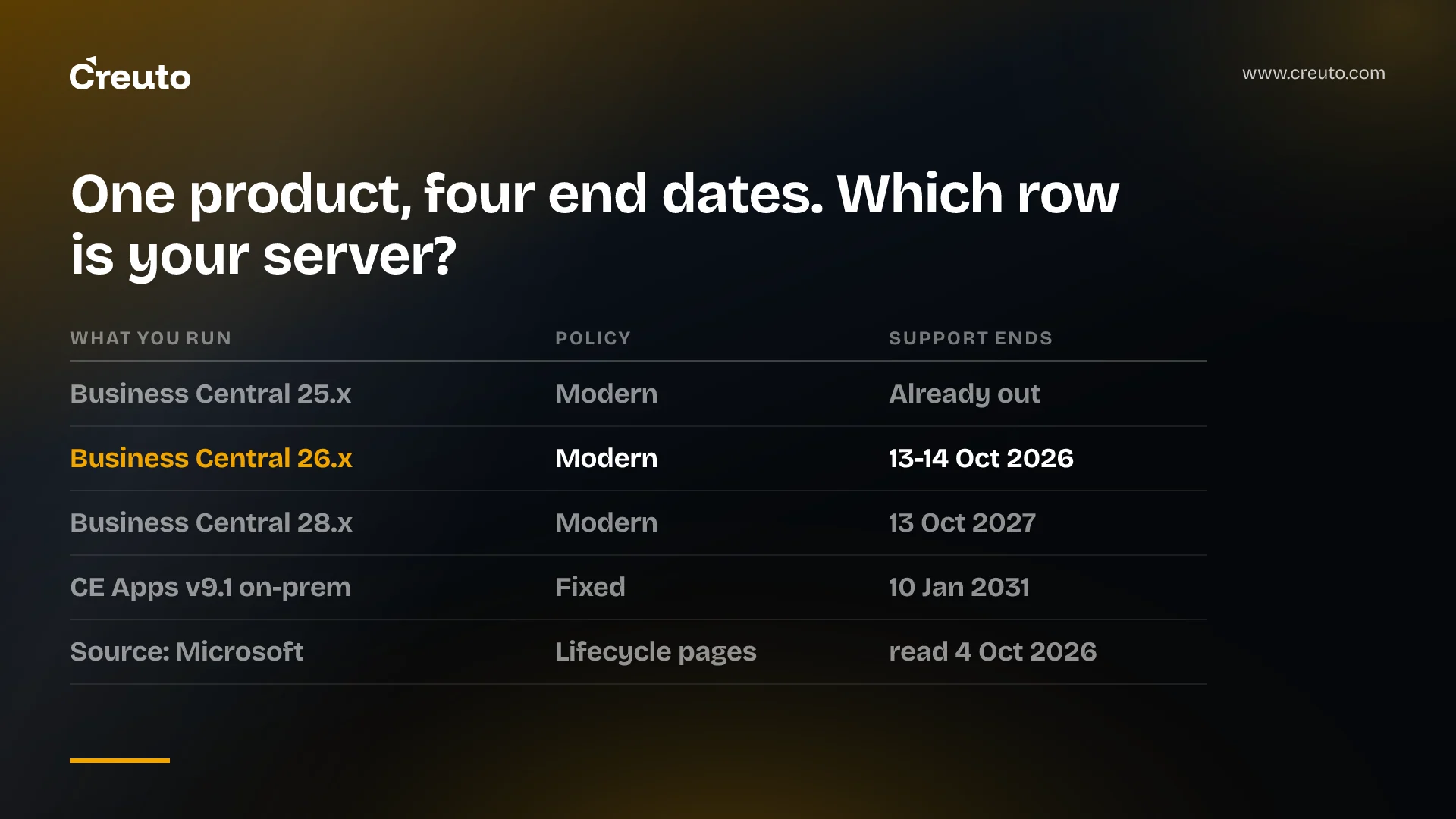
Dynamics 365 on-premise end of life is not one date. Business Central on-premises retires one version at a time — 2025 release wave 1, version 26.x, stops being serviced in the middle of this month — while Customer Engagement Apps v9 on-premises now carries support dates running into 2031. Which situation you are in depends on the version number on your own server, not on the product name.
Today is 4 October 2026. Version 26.x has either nine days left or ten, depending on which Microsoft Learn page you open, and we will come back to that disagreement because it tells you something about how the rest of these dates should be read.
Dynamics 365 on-premise end of life, version by version
Everything below comes from the Microsoft Lifecycle product pages rather than from partner summaries. Support dates on those pages are stated in Pacific Time.
| What you run | Lifecycle policy | Support ends | Status on 4 Oct 2026 |
|---|---|---|---|
| Business Central 24.x (2024 wave 1) | Modern | 8 October 2025 | Out of support |
| Business Central 25.x (2024 wave 2) | Modern | 5 April 2026 | Out of support |
| Business Central 26.x (2025 wave 1) | Modern | 14 October 2026 | Days left |
| Business Central 27.x (2025 wave 2) | Modern | 6 April 2027 | In support |
| Business Central 28.x (2026 wave 1) | Modern | 13 October 2027 | In support |
| Business Central 29.x (2026 wave 2) | Modern | 6 April 2028 | In support |
| Business Central 14.x (Spring 2019) | Fixed | 15 October 2025 | Out of support |
| CE Apps v9.0 (original release) | Fixed | 12 July 2023 | Out of support |
| CE Apps v9.1 (Service Pack 1) | Fixed | 10 January 2031 | In support |
The Business Central rows come from the Business Central on-premises (Modern Policy) lifecycle page and the Fixed Policy page that covers versions 13.x and 14.x. The Customer Engagement rows come from the v9.x on-premises lifecycle page.
Two rows there surprise most people we talk to. A Business Central estate can already be out of support without anything having happened: 25.x passed its end date on 5 April 2026 and 24.x on 8 October 2025. And Customer Engagement v9 is in a completely different position from the CRM product most teams think of as its ancestor — Dynamics CRM 2016 reached end of support on 13 January 2026, per Microsoft's list of products ending support in 2026, and nothing extends it.
Mainstream, extended and out of support are three different things
This is where the genre goes wrong, so it is worth being exact. The three phases are defined on Microsoft's Fixed Lifecycle Policy page, which sets out what each one includes.
- Mainstream support. Security updates, the ability to request non-security updates, incident support, and requests to change product design and features.
- Extended support. Security updates at no additional cost, and paid support. Microsoft states it will not accept requests for warranty support, design changes or new features in this phase, and non-security updates are not available.
- Beyond end of support. Security updates only through the Extended Security Update programme, where one is offered. Self-help documentation stays up for a minimum of 12 months.
Nothing stops working at any of those boundaries. Your server keeps serving and your integrations keep running. What changes is whether a fix exists when something breaks, and whether a security update ships when a vulnerability is found.
Business Central on-premises from version 15 onward is governed by the Modern Lifecycle Policy instead, and that distinction matters more than the dates do. Modern Lifecycle has no mainstream and extended phases: a product stays in support only while the customer stays current with published servicing requirements. Microsoft's own Business Central lifecycle policy article says the policy offers "bug fixes, new features, and latest tax updates", but "only if the customer keeps the deployed software current according to this policy".
Read that against the practical mechanism and the consequence is concrete. Fixes reach a Business Central on-premises estate as numbered cumulative updates; the 26.x update list runs to Update 26.18, released in October 2026 with application build 26.18.55014. When 26.x leaves support, that list stops growing. There is no security-only tail for it the way extended support gives one to Customer Engagement v9, because the Modern Lifecycle Policy does not define such a phase. Regulatory and tax updates ride in the same cumulative updates, which is the part finance teams tend to care about first.
Microsoft's pages disagree with each other, and that is the real lesson
On the Business Central lifecycle page, version 26.x has an end date of 14 October 2026. On Microsoft's products ending support in 2026 summary, the same version is listed with an end of servicing of 13 October 2026. Both are Microsoft Learn. The same one-day offset appears on 25.x: 5 April on the product page, 4 April on the summary page.
The Customer Engagement discrepancy is larger and matters more. Most coverage of this topic cites the Microsoft Learn announcement "Support extended for Dynamics 365 for Customer Engagement Apps, v9 (on-premises)", which says mainstream support moved from 14 January 2025 to 12 January 2027 and extended support from 13 January 2026 to 9 January 2029. That page's own footer gives a last-updated date of 14 June 2024.
The v9.x product lifecycle page now shows something else: mainstream support ending 13 January 2029 and extended support ending 10 January 2031, with a note stating the dates were extended to 12 January 2029 and 9 January 2031 respectively. Meanwhile Microsoft's products ending support in 2029 page still lists Customer Engagement Apps v9.x on-premises with an end of support of 9 January 2029 — the superseded extended-support date.
So the product was extended twice, and two of Microsoft's three relevant pages still carry an earlier set of dates. Our reading is that the per-product lifecycle page is the one to trust, because it is the page the lifecycle search resolves to and it carries the later note. We would not plan a board-level decision on it without having a Microsoft or partner contact confirm it in writing, and we would date-stamp whatever they confirm. If you are budgeting a CRM migration on "supported until 2029", the number you are working from may be two revisions old in the wrong direction — you may have two more years than you think.
How to check which Business Central version you run
Most people who need this post do not know their version number, because it lives with whoever installed the system. There are two reliable ways to get it in a minute.
- From inside the client. Open the Help pane, then the Help & Support page. Microsoft's product help and support documentation states that the Troubleshooting section of that page shows the current version of your Business Central, alongside the latest error message. On-premises, that section is only present from 2020 release wave 2 (version 18) onward — if you cannot find it, that itself tells you something.
- From the build number. A build like 26.18.55014 reads as release 26, cumulative update 18. The leading number is the one that decides your date: 26 is 2025 release wave 1, 27 is 2025 release wave 2, 28 is 2026 release wave 1. Cross-check against the per-release update lists on Microsoft Learn, which give every build number for a release.
For Customer Engagement, the split that matters is 9.0 against 9.1. Version 9.0 as originally released left support on 12 July 2023; Service Pack 1, version 9.1, is the one carrying dates into 2031. Microsoft's guidance on applying the 9.1 update also warns that a 9.0 deployment at 9.0.47.08 or later must take the 9.1.20.11 update or later, because mixing an older 9.1 package onto a newer 9.0 build causes assembly load failures. If you are on 9.0, you are not on a 2031 clock. You are already past the end.
The strongest case for moving Dynamics to the cloud
This case deserves to be put properly, because for a large share of mid-market estates it is the right answer.
On-premises Business Central puts you on a treadmill that never stops. Every release wave gets roughly eighteen months of servicing, which means a planned upgrade every twelve to eighteen months, forever, each one with its own test cycle, extension recompiles and downtime window. The Modern Lifecycle Policy's bargain is explicit: stay current or leave support. If your customisations are light and your integrations are few, that upgrade treadmill is pure cost with no strategic return, and the online service removes it entirely.
The second argument is sharper. Everything Microsoft builds next for Dynamics — the Dataverse-native capabilities, the model-driven app surface, the AI features — ships to the online product. An on-premises estate does not stand still; it diverges, and the gap compounds each release wave. Staying on-premises to avoid a migration is a decision to fall behind on purpose.
The third is operational. On-premises means you own the SQL Server, the patching, the backups, the disaster recovery test nobody has run in years, and the one person who knows how the install was configured. That person leaves eventually.
When a cloud migration is the wrong answer
Here is the part the Dynamics partner channel has no incentive to write. The platform is not what costs money to move. The integrations and the customisations are.
A Business Central or CRM estate that has been in production for eight years is rarely the product. It is the product plus a decade of accumulated fit: custom tables and fields, plugins that fire on save, reports finance will not work without, a nightly job that reconciles the warehouse system, a portal built against the on-premises endpoint. In a lift-and-shift every one of those is a separate work item, and the ones written against on-premises-only constructs are not migrations at all — they are rewrites, done on a deadline set by someone else's lifecycle page.
When we price that honestly for a mid-market estate, the comparison sometimes inverts. If most of the migration cost is rebuilding a customised surface anyway, you are not choosing between "keep" and "move". You are choosing between rebuilding that surface inside the vendor's extensibility model and rebuilding it as software that fits the workflow you actually have, with the standard finance and inventory functions staying wherever they are cheapest to run.
We have built both halves of that argument. The custom ERP we delivered for a large-scale industrial client unified HR, CRM, inventory and finance in one browser-based platform across four departments, with one source of truth and no data silos after launch. Our AI-powered sales CRM covers the 360-degree customer lifecycle with a market intelligence engine. Neither is a claim that replacement beats migration in general. They are evidence that a scoped replacement of the customised surface is a real option with a known shape, which is exactly what a board is not told when the only people in the room sell migrations.
Three conditions make replacement the better bet, in our experience across custom ERP development work. Your customisations encode a process that is genuinely yours rather than a workaround for a product gap. Your standard-functionality usage is narrow enough that the vendor licence is mostly paying for modules you never open. And your integration layer is already the system of record in practice, with the ERP acting as a ledger behind it. Miss any one of those and migration is almost certainly cheaper.
The inverse is just as important to say out loud. If your Business Central install is close to standard, if your extensions are a handful of AL objects, if your finance team depends on localisation and tax updates Microsoft ships for your country — do not let anyone, including us, talk you into a replacement. Upgrade to a supported release wave and move on. The same logic we applied to SAP ECC end of maintenance holds here: a vendor deadline is a good reason to re-examine a decision, and a terrible reason to make a large one quickly.
What to do before mid-October
If you run Business Central on-premises, the task this week is not a strategy. It is a version number and three lists.
- Get the version. Help & Support page, Troubleshooting section, or the build number from whoever runs the servers. Write it down with today's date.
- Decide whether mid-October is actually your deadline. If you are on 27.x or later, it is not — you have until at least April 2027. If you are on 25.x or earlier, the deadline passed and the question is how long you have been running without servicing.
- List what breaks on an upgrade before you commit to one. Every extension, every integration endpoint, every report finance signs off on. That list is the real cost of both paths, and until it exists, nobody in the room is comparing anything.
Then take the decision on a normal timetable rather than this one. A version falling out of servicing is a risk that grows gradually, not a switch that flips on 14 October. The failure mode we see is not the unpatched server — it is the twelve-month migration signed in nine days because a date looked like an emergency. Nothing on a Microsoft lifecycle page obliges you to pick between staying put and lifting everything; the legacy application modernisation question of which parts move, which get rebuilt and which get retired is still yours to answer.
Frequently asked questions
There is no single date. Business Central on-premises retires one release wave at a time, with version 26.x ending in mid-October 2026 and version 28.x in October 2027. Customer Engagement Apps v9.1 on-premises has mainstream support to January 2029 and extended support to January 2031.
Microsoft's Business Central on-premises lifecycle page gives version 26.x an end date of 14 October 2026, while Microsoft's products-ending-support-in-2026 summary lists it as 13 October 2026. Both are Microsoft Learn pages, and the one-day offset appears on other release waves too.
Mainstream support includes security updates, requests for non-security updates and product design changes. Extended support keeps security updates at no extra cost and paid support, but Microsoft will not accept design changes, new features or non-security update requests during that phase.
Business Central on-premises version 15 and later sits under the Modern Lifecycle Policy, which has no extended support phase at all. Fixes and regulatory updates reach the product as numbered cumulative updates, and that list stops growing once a release wave leaves support.
Open the Help pane in Business Central and go to the Help and Support page. Microsoft documents that the Troubleshooting section shows your current version. On-premises, that section exists only from 2020 release wave 2, version 18, onward; otherwise ask whoever runs the server for the build number.
No. The lifecycle dates oblige you to stay on a serviced version, not to change deployment model. For estates that are close to standard, upgrading a release wave is the cheapest path; for heavily customised estates, the integrations and customisations are what cost money to move, whichever direction you go.
