Claude Code settings.local.json: how passwords reached GitHub
Claude Code settings.local.json saves each 'don't ask again' command, secrets included. How 1,122 public files leaked and the fixes that break the chain.
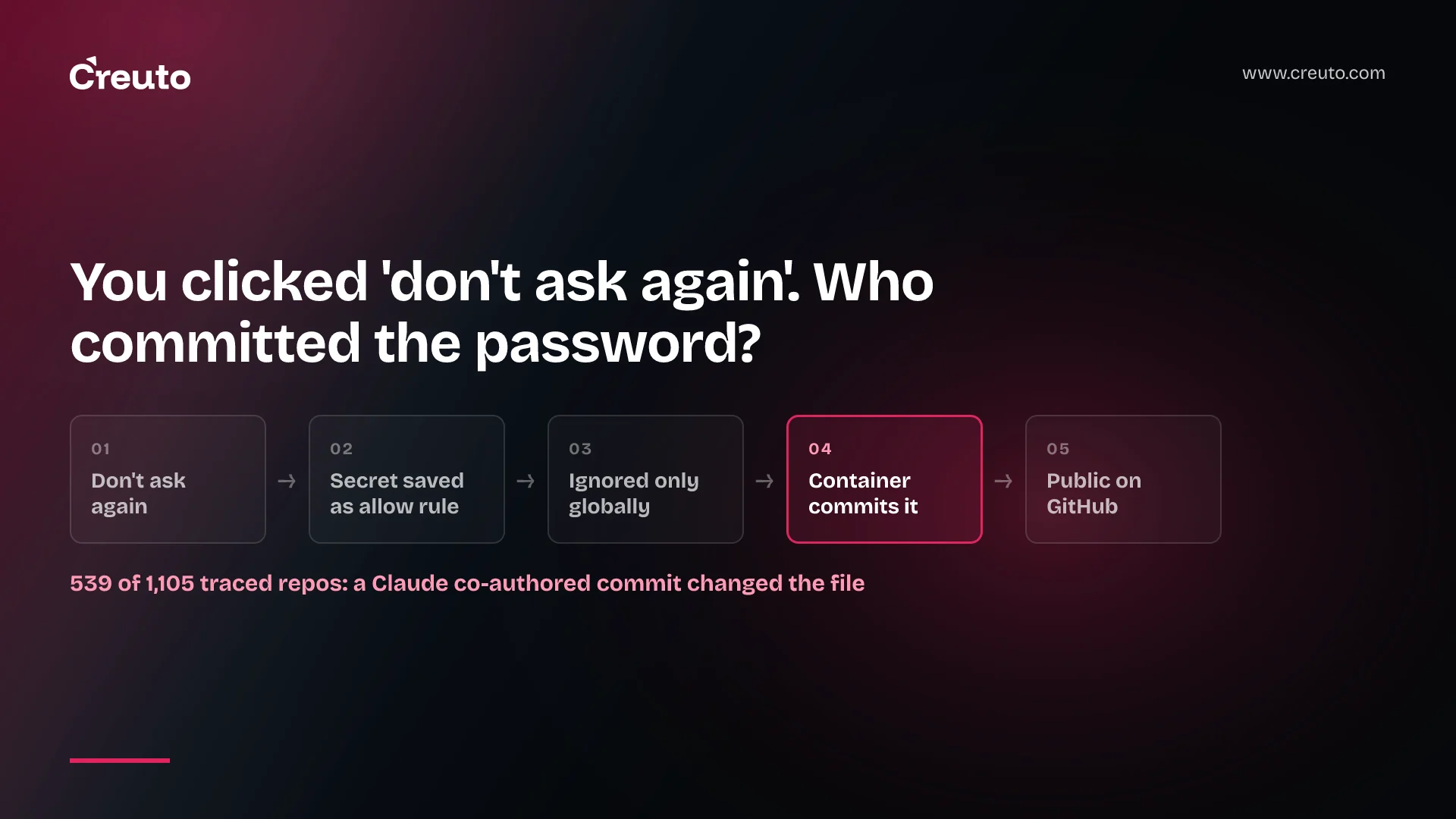
The passwords did not leak because someone clicked a button. They leaked because a chain of four ordinary steps lined up. Claude Code settings.local.json is where "Yes, and don't ask again" saves the approved command, secret and all; Claude Code keeps that file out of git only through your machine's global excludes; and anywhere that global file is missing, the next commit can carry it to GitHub. By the end of this post you will know which link to break first, and which control your team should own.
The prompt was a report from Apiiro, published on 7 November 2026, titled on Hacker News as "Claude Code's 'Don't Ask Again' exposes passwords in 1,122 public GitHub files". The thread passed 500 points. Apiiro's own page blocked our automated fetches and an archived copy renders no article text, so every figure below comes from the researcher's replies in that thread or from passages commenters quoted from the report.
The key facts, as of 9 November 2026
- 1,122 files containing secrets, all in public repositories, according to the researcher, replying as shmulc.
- 539 of 1,105 traced repositories had the file changed by "a commit co-authored by Claude", per the report as quoted in the thread, which adds that those commits "name every recent model, from Sonnet 4.5 to Opus 5.5".
- No secret scrubbing yet. Boris from the Claude Code team (bcherny on Hacker News) wrote that "Historically Claude Code has not done secret scrubbing" and that the team is "looking into what we can do to prevent this".
- Who is affected: any repository where a developer approved a command containing an inline credential and the local settings file later got committed.
What "Yes, and don't ask again" writes into claude code settings.local.json
A standing approval becomes an allow rule in .claude/settings.local.json. Anthropic's settings documentation says that when you choose "Yes, and don't ask again" for a Bash command, Claude Code saves that approval there, and that it creates the file the first time you give such an approval. The permissions documentation adds that Bash approvals last "permanently per repository and command" and that the file sits at the root of the git repository, even when you started the session in a subdirectory or a worktree.
The rule records the text the prompt showed you. The permissions page says a rule you save from a prompt "covers only what its option named", and its example prompt offers "Yes, and don't ask again for: npm test *". That is harmless for npm test. It is not harmless for a curl call with a bearer token pasted into the header, or a psql connection string with the password inline. One commenter described exactly that: approve a curl command carrying a token once, and "that token sits in settings.local.json until someone happens to reread the file".
The leak is a chain of four links, not one bug
The Hacker News title reads as if the button publishes passwords. One of the first replies on the thread called it a "confusing headline": the files only became public because people committed their local settings and then published the repo. The researcher agreed: "That's the chain, yes." Each link is worth naming because each one has a different owner.
| Link | What happens | Who can break it |
|---|---|---|
| 1. Approval | A command with an inline secret is saved verbatim as an allow rule | The developer, by keeping secrets out of command text |
| 2. Ignore | Claude Code adds **/.claude/settings.local.json to the global git excludes file, not the repo's .gitignore | The repo owner, with a committed ignore entry |
| 3. Commit | An environment without that global file stages and commits it, sometimes in a Claude co-authored commit | A pre-commit hook in the repo |
| 4. Publish | The push reaches a public or later-public repository | Server-side secret scanning and push protection |
Link 2 is the one most teams have not thought about. The settings documentation says that the first time Claude Code writes the file in a repository that does not already ignore it, it adds the pattern to core.excludesFile if your global git config sets one, otherwise to $XDG_CONFIG_HOME/git/ignore or ~/.config/git/ignore. That protection lives in your home directory. The project folder carries no record of it.
Where the global ignore is missing
The researcher first said "a fresh clone or a second machine commits it". Challenged that a fresh clone would not contain the file, they corrected it: the leak happens "on a new machine or container without the global ignore, in a copied project folder, or once the file has been committed, since ignore rules don't apply to tracked files." That last clause is standard git behavior; the gitignore reference states that "Files already tracked by Git are not affected".
Containers are the case that matters for teams running agents. A commenter described a sandboxed agent with no access to the host's global ignore, a secret already in .claude, then "Commit and push. Secret leaked." If your agents run in dev containers or ephemeral sandboxes whose home directory is rebuilt each time, link 2 does not exist there.
The strongest counter-argument, and why it does not settle it
Anthropic's position deserves its full weight. Boris wrote that the file "is meant to stay local", that "We automatically gitignore it when Claude creates the file, so in this case the files were manually created and checked in", and that everyone should run secret scanning regardless of which agent they use. He also argued that manual allow lists are the wrong tool: "Everyone should be using auto mode instead." The documentation backs the first point and explicitly tells you to add a hand-created file to .gitignore yourself.
The difficulty is the 539 figure. If more than half of the traced repositories had the file changed by a commit carrying Claude's co-author trailer, the agent was often the one staging it, inside environments where the auto-ignore was not in effect. "User error" and "tooling gap" are both true here, and a CTO only controls one of them. The thread does not say how those commits came to include the file, so treat it as a pattern to guard against rather than a diagnosed bug.
Should .claude/settings.local.json be committed to git?
No. The local file should never be committed, and the shared file should be. Anthropic's documentation says to commit .claude/settings.json "so everyone who clones the repository gets the same permissions, hooks, and plugins", while the local file is for "Personal overrides for one project". There is also a security reason beyond leaked secrets: per the permissions page, an untracked local file's allow rules apply without the workspace trust step, but once the file is tracked by git Claude Code treats it as repository-supplied and holds its rules until you trust the folder.
| File | Commit it? | What belongs there |
|---|---|---|
.claude/settings.json | Yes | Team permissions, hooks and plugins, with no secrets |
.claude/settings.local.json | Never | Your own overrides and the allow rules your approvals create |
managed-settings.json | No; deployed by IT or the admin console | Organization policy nobody can override locally |
The same tracked-versus-local question shows up with agent instruction files; our note on AGENTS.md vs CLAUDE.md covers which of those belong in the repository.
How to stop Claude Code leaking secrets: break every link
Do not rely on a single control. Each step below breaks a different link, so one failure does not reach GitHub.
- Commit the ignore entry. Add
.claude/settings.local.jsonto the repository's own.gitignore, so every clone, container and copied folder inherits it. If the file is already tracked, rungit rm --cached .claude/settings.local.json, because an ignore rule does nothing for a tracked file. - Keep secrets out of command text. Reference
$API_TOKENinstead of pasting the value, so an approval saves the variable name and not the credential. Two commenters (here and here) independently landed on this rule. While you are there, open the file and delete any allow rule that already contains a credential. - Block it at commit time. Gitleaks ships a pre-commit hook configured in
.pre-commit-config.yamland installed withpre-commit install. Add a second hook that fails any commit staging a path ending insettings.local.json, which catches the file even when its secret matches no pattern. Note that gitleaks documents aSKIP=gitleaksescape, so the hook is a guardrail, not a policy. - Turn on push protection, and know its limit. GitHub's push protection blocks provider tokens and, once generic patterns are enabled, structured secrets such as private keys and connection strings. Plain passwords count as unstructured; GitHub blocks those only through AI-detected generic secrets, a public-preview feature billed separately. A database password in an allow rule may pass straight through, which is why steps 1 to 3 come first.
Steps 1 and 3 belong in the repository template your team clones from, alongside the rest of your CI/CD implementation, so new projects start protected.
How teams lock down Claude Code permissions with managed settings
Managed settings are the only layer a developer cannot override. Anthropic's managed settings guide gives a starter managed-settings.json that denies Read(./.env) and Read(./secrets/**), disables bypass mode and sets allowManagedPermissionRulesOnly, which makes Claude Code ignore permission rules from user, project and local files. With that key set, a "don't ask again" rule in the local file no longer grants anything, so approvals stop accumulating as standing grants.
This is the wrong choice for a five-person team experimenting with agents: a central allow list that nobody maintains just trains people to approve prompts one at a time. It is the right choice once agents run in shared containers or CI, where nobody's personal global ignore applies. Boris's alternative, auto mode, replaces per-command approvals with a classifier; the settings docs note that auto as a default mode only takes effect from user or managed settings, not from a repository file.
How to find leaked secrets in Claude Code settings files
Start with what git already knows. Run git log --all -- .claude/settings.local.json in each repository to see whether the file was ever committed, then scan full history with gitleaks git, which, per its README, walks patches through git log -p. The report itself, as quoted in the thread, told readers to search their GitHub organization for both .claude/settings.local.json and .claude/settings.json.
If you find a credential, rotate it before you touch history. GitHub's guide to removing sensitive data says the first step for a secret is to revoke or rotate it, and warns that a commit that reached any fork stays accessible there. A rewrite is cleanup; rotation is the fix. We covered the mechanics of short-lived keys in OpenAI API key security, and the wider risk of agents shipping repository contents in AI coding tool data privacy.
What to decide before the next agent rollout
The decision is not whether to trust Claude Code. It is whether the controls that stop this leak live on each developer's laptop or in the repository and the organization. A global excludes file is a laptop control; a committed .gitignore, a pre-commit hook and managed settings travel with the code and the containers. If your agents already commit on their own, only the second kind applies to them.
Our DevOps and cloud engineering team sets up exactly this layer for clients rolling coding agents out across a team: repository templates with the ignore entries and secret-scanning hooks, container images that carry them, and managed settings that match how your agents actually run. If you want a second pair of eyes on your current setup before the next rollout, that is a short conversation.
Frequently asked questions
The .claude/settings.local.json file should never be committed to git. Anthropic's documentation describes it as your personal override file for one project, and it holds the allow rules your 'don't ask again' approvals create, which can include credentials. Commit .claude/settings.json for shared team settings instead.
Choosing 'Yes, and don't ask again' on a Bash prompt saves an allow rule in .claude/settings.local.json at the repository root. The rule records the command or prefix the prompt named, so a token or password typed inline in that command is stored in the file as plain text.
Claude Code adds **/.claude/settings.local.json to your global git excludes file the first time it writes the file, not to the repository's .gitignore. A hand-created file, a container without that global file, a copied project folder, or an already-tracked file is not protected, so add a repo-level ignore entry.
To find leaked secrets in Claude Code settings files, run git log --all on .claude/settings.local.json in each repository, scan full history with gitleaks, and search your GitHub organization for .claude/settings.local.json and .claude/settings.json. Rotate any credential you find before rewriting history, because forks keep old commits.
Teams lock down Claude Code permissions with managed settings, which developers cannot override. Setting allowManagedPermissionRulesOnly makes Claude Code ignore allow rules from user, project and local files, and managed deny rules such as Read(./.env) block file reads of secrets across every project on the machine.