Android agentic workflows: when the agent runs in the cloud
Android agentic workflows that survive backgrounding run server-side. How ADK, AG-UI and A2UI stream native Compose cards, and when on-device still wins.
Google's own justification for cloud-side Android agentic workflows is not accuracy or model size. It is that the app might get closed. In the Android Developers post published on 28 September 2026, the argument for moving a booking assistant off the device is that a multi-step process running in a mobile session loses its progress when the process dies — and on Android, the process dies. That is an architecture decision, not a model decision.
The post is part five of the "Build intelligent Android apps" series, and it is the first one where the intelligence does not run on the phone at all. A coordinator agent runs on a self-hosted backend, orchestrated with the Agent Development Kit. The app connects to a session, watches progress stream in, and supplies input only when the agent asks for it. Below is what that costs you in architecture, and where on-device inference is still the better answer.
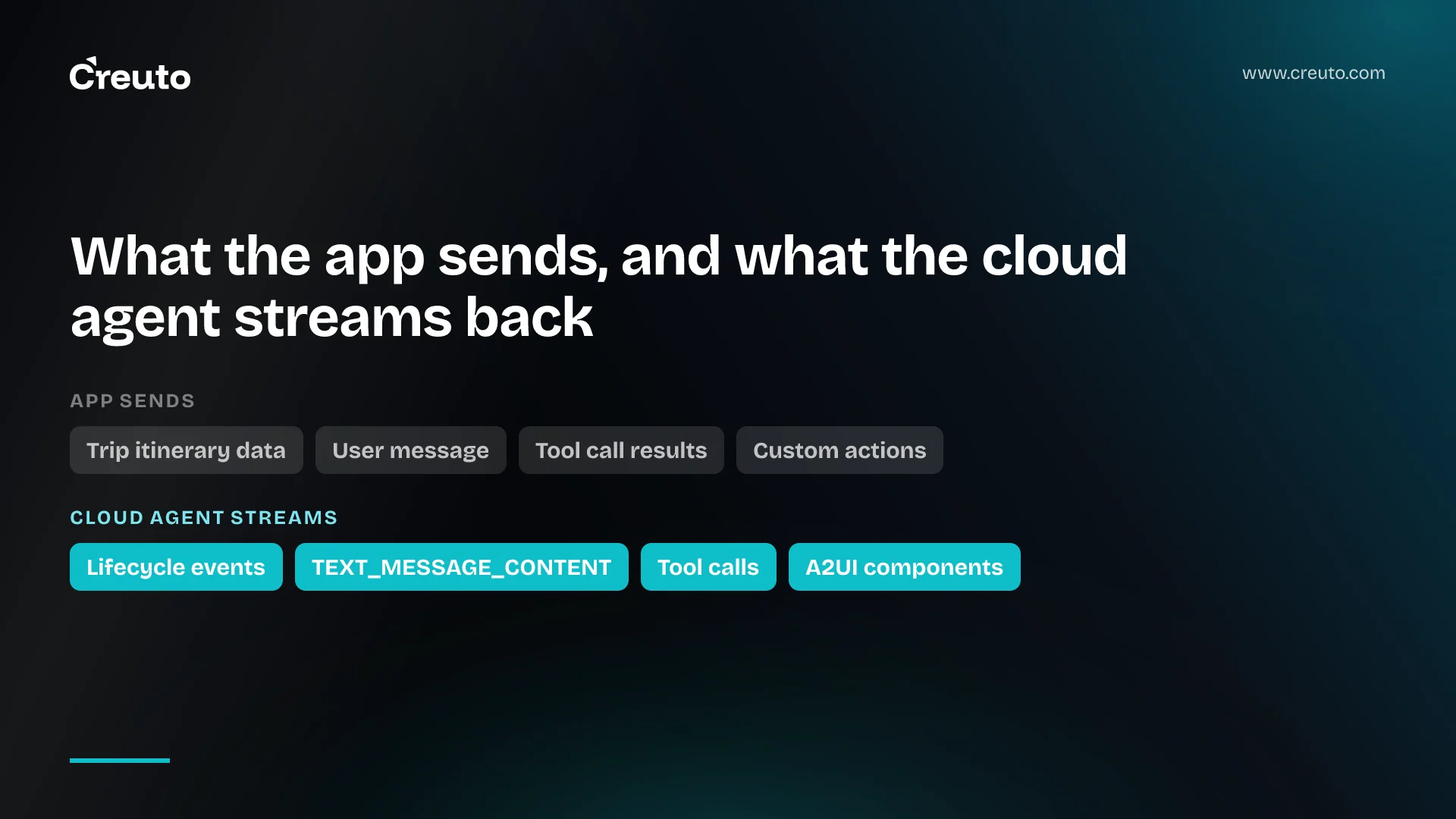
What the app sends and what the cloud agent streams back
The shape is deliberately thin on the client. The Android app sends the current trip itinerary data to the server; the coordinator agent decides which subagents to trigger; each subagent pushes its results to a shared session queue that streams back to the app. Nothing about which flight API is called, or in what order, lives in the APK.
The transport is AG-UI, a bidirectional protocol that standardises message types between agents and UI clients. On the server it yields Server-Sent Events — TEXT_MESSAGE_CONTENT carrying a JSON delta, for instance — and the Kotlin SDK maps each payload to a type-safe client event such as TextMessageStartEvent, TextMessageContentEvent and TextMessageEndEvent, collected in a ViewModel. Traffic goes both ways: the agent sends lifecycle events, text, tool calls and state; the client sends user messages, tool call results and custom action events.
Why the agent describes UI instead of returning text
This is the part worth stealing even if you never run an agent. A conventional assistant returns text or a bespoke JSON payload, and the client parses it into a pre-built screen. Google names the cost of that directly: every new feature, layout change or interaction means shipping both a backend change and an app update, then waiting for users to install it.
The Agent-to-User Interface protocol (A2UI) inverts it. The client declares a catalogue of components it supports; the server sends JSON naming which of those components to render and with what properties. A flight picker arrives as a component ID, a prompt, an options array, a selectedIdx and a confirm button label — not as a rendered widget and not as prose. The client keeps the visual implementation; the agent keeps the workflow state.
On the backend, an A2uiSchemaManager compiles the catalogue's JSON schemas and layout rules into the system prompt, so the model is grounded in exactly which components exist and which properties they accept. On the device, the new Jetpack Compose A2UI renderer libraries — androidx.a2ui:a2ui-model, the Compose runtime and UI artifacts, and material3-a2ui, all at 1.0.0-alpha01 — map each catalogue component to a composable, and an A2uiSurface composable handles reactive state, Material 3 loading indicators, error fallbacks and animated transitions between updates. If your agent only needs text, cards, buttons, rows, columns, checkboxes and date-time pickers, materialA2uiBasicCatalogV1 ships those ready-made.
There is a versioning catch stated plainly in the post: backend and client share a catalogue definition ID, and adding or modifying a property on the backend catalogue requires bumping the version and updating the matching Kotlin component class, or parsing breaks. Server-driven UI removes the app-store release from the loop; it does not remove the compatibility problem, it relocates it into a contract you now own on both sides.
Should the agent run on device or in the cloud?
On device, when the work fits in one screen session and the data should not leave the phone. Google's own AI on Android guidance puts privacy, offline operation, no per-token cost and lower latency on the on-device side, with Gemini Nano and the ML Kit GenAI APIs as the route in. Part two of the same series uses on-device models for itinerary summarisation and receipt parsing — single-shot transforms of data the user already has. Nothing about those needs a server. The same three-way choice exists on the other platform, and we worked through it for on-device, cloud or a hosted model on iOS 27 — the deciding question there was identical: does this work have to survive the app closing?
In the cloud, when any of four things is true. The work outlives the session: booking a flight, a hotel, a museum and a restaurant involves waiting on external systems, and the post's whole premise is that progress must survive the app going to the background or losing connectivity. The work needs orchestration: a coordinator delegating to specialised subagents with dependencies between them is not something you want scheduled against a foreground process. The work needs credentials: the post notes that managing API credentials on a phone gets complicated quickly, and a payment or booking credential on a device is a liability, not an inconvenience. Or the interface itself needs to change faster than you can ship releases.
The honest counter-argument is that most of what teams call an agent is none of these. A summariser, a classifier, an extraction step over a document the user just photographed — those are one-shot calls. Running them through a cloud orchestrator adds a network round trip, a backend to operate and a per-request bill in exchange for nothing. In the Android apps we build, the question we ask first is whether the work can fail halfway and matter. If it cannot, it does not need a session that survives. The second question is whether a human has to approve something mid-flight. Google's sample marks the reservation tool with require_confirmation=True, which is the agent pausing and asking, and a pause is exactly the state a foreground process cannot hold.
Long-running agents on mobile are a backend problem
Once the agent runs server-side, the interesting constraints stop being Android constraints. You are operating a long-lived process per user session, with tool execution, model calls and external API waits inside it, and that is the same infrastructure problem as hosting long-running agents in cloud sandboxes or running agent orchestration on Kubernetes. Session lifetime, idle cost, retry semantics and what happens when a subagent hangs are now yours. The Android side is the easy half.
Session resume is the feature, so design for it
The AG-UI client is configured with an agentId, a threadId and a backend URL, and a run is started with a RunAgentInput carrying the thread ID, a run ID and the messages. That thread ID is the resume handle. Because the agent is running in the cloud regardless of whether anyone is watching, reconnection is a matter of attaching to the same thread and replaying state — which is why AG-UI carries state snapshot and delta events alongside the text stream.
The example in the post runs agents with an InMemoryRunner against a session ID, which is the right choice for a blog post and the wrong one for production. In-memory sessions do not survive a backend restart or a second instance behind a load balancer, so the first piece of work after copying the example is deciding where session state actually lives. Plan for the user who starts a booking, closes the app, and opens it again two days later on a different device.
Android agentic workflows shift cost and privacy onto you
Cloud agents move three costs onto your books that on-device inference does not have. Every model call is billed, and a multi-agent orchestration makes several per user turn — the sample's coordinator plus flight, hotel, museum and restaurant subagents is a realistic fan-out. The backend runs per active session rather than per request, so idle sessions cost money. And the streaming connection means concurrency is measured in open connections, not requests per second, which changes how you size and autoscale.
Privacy moves too, and in the direction that needs a decision rather than a default. On device, the itinerary never leaves the phone. In this architecture, the app sends the current trip itinerary data to your server, and your server sends it to a model. Which fields actually need to reach the model is a question worth answering before the first sprint, not after a review. The practical middle ground that the series itself demonstrates is hybrid: on-device models for the parts that touch personal data locally, a cloud agent for the parts that talk to external systems anyway.
What to build first
Do not start with the agent. Start with the catalogue. The component catalogue is the contract between your backend and your app, it is versioned, and it is the thing that will be painful to change once both sides ship — so the first design session is which interactive components your domain actually needs, not which model to call. The sample defines three custom ones for booking: an InteractiveOptionPicker, a SeatSelectionPicker and a BookingStatus display.
Then build the session store before the orchestration, because that is where the resilience the whole architecture was chosen for actually lives. Then add one agent with one tool and stream it end to end — a single AG-UI text stream rendered in Compose is enough to prove the transport before any multi-agent work begins. The full Jetpacker sample is on GitHub under Apache-2.0, and reading the ViewModel is faster than reading the post. Everything named here is as published on 29 September 2026, and the Compose A2UI libraries are at alpha, so expect the API to move.
Frequently asked questions
Google's reference approach runs the agent on a self-hosted backend built with the Agent Development Kit, streams updates to the app over the AG-UI protocol, and lets the agent describe interactive components with A2UI that Jetpack Compose renders natively. The app holds a component catalogue and a thread ID, not the orchestration logic.
Run it on device when the work is a single-shot transform of data already on the phone, such as summarising an itinerary or parsing a receipt. Run it in the cloud when the work outlives the session, needs multi-agent orchestration, holds external API credentials, or when the interface must change without an app release.
A2UI, the Agent-to-User Interface protocol, lets a cloud agent describe UI components rather than returning text. The client declares a catalogue of components it supports and the server sends JSON naming which to render and with what properties, so backend workflow changes do not require an app update.
AG-UI is the transport: a bidirectional protocol carrying lifecycle events, text messages, tool calls and state between agent and client over Server-Sent Events. A2UI is the payload format for interfaces, describing which catalogue components the client should render. They are used together in Google's Android sample.
Yes, and that is the stated reason for the architecture. Google's post explains that booking agents run autonomously in the cloud so progress is never lost if the mobile app goes to the background or loses internet connectivity. The app reconnects to the same session thread and resumes watching.
Three costs move onto your backend: per-token model calls multiplied by the number of subagents in each turn, a session that runs whether or not anyone is watching it, and concurrency measured in open streaming connections rather than requests per second. On-device inference has none of these.
Not yet. As of 29 September 2026 the androidx.a2ui model, Compose runtime and UI artifacts and material3-a2ui are all published at version 1.0.0-alpha01, so the API surface should be expected to change. Pin versions and keep your component catalogue versioned on both sides.
